Technical SEO: The Complete Guide for UK Businesses (2026)
Your website could have great content, strong design and exactly what your customers are searching for. But if search engines struggle to crawl, render, understand or index your pages, your visibility suffers before your content even gets the chance to compete. That is the job of technical SEO.
Technical SEO looks after the foundation of a website. It helps search engines access and understand your pages, and it gives users a faster, clearer and more reliable experience. For UK businesses it becomes more important as a website grows, adopts new technologies, expands internationally or adds thousands of URLs.
This guide explains what technical SEO is, the areas it covers, how each one affects rankings, and how to build a practical technical SEO strategy for 2026, with a checklist you can use straight away.
What Is Technical SEO?
Technical SEO is the process of improving a website’s technical setup so search engines can efficiently crawl, render, understand and index its pages. It covers crawling and indexing, site architecture, page performance, mobile usability, canonicalisation, structured data, JavaScript rendering, international targeting and crawl budget management.
Think of it as the foundation under the rest of your SEO. You can publish excellent content and earn authoritative backlinks, but technical problems limit their value: important pages are hard to discover, duplicate URLs send conflicting signals, or essential content is missing when a search engine processes the page. Technical SEO finds and removes those barriers.
Technical SEO vs On-Page and Off-Page SEO
SEO is usually split into three areas that work together. Technical SEO makes sure search engines can access and process your site. On-page SEO improves the content and elements on each page, such as headings, copy, title tags and internal links. Off-page SEO builds authority from outside your site through links, digital PR and brand mentions.
If your pages are already crawled and indexed but are not ranking, the gap is often on the page itself, which is where on-page SEO services come in. If pages are missing from Google altogether, start with technical SEO.
Why Does Technical SEO Matter?
Search engines have to discover and process your content before it can compete in organic search, so technical SEO underpins every other part of an SEO strategy. A technically healthy website makes it easier for Google to find important pages, understand how content relates, identify preferred URLs and pick up changes quickly.
The same improvements benefit users. Faster pages, logical navigation, mobile-friendly layouts and fewer broken journeys all improve the experience, and they usually improve conversion rates too.
The scale of the challenge varies. A small service website has a fairly simple setup. An ecommerce store, SaaS platform, marketplace or international brand can have hundreds of thousands of URLs generated by products, filters, applications, languages and regional versions. For businesses facing that complexity, working with a technical SEO agency in London gives you a structured way to find and prioritise the problems that matter.
How Do Crawling, Rendering and Indexing Work?
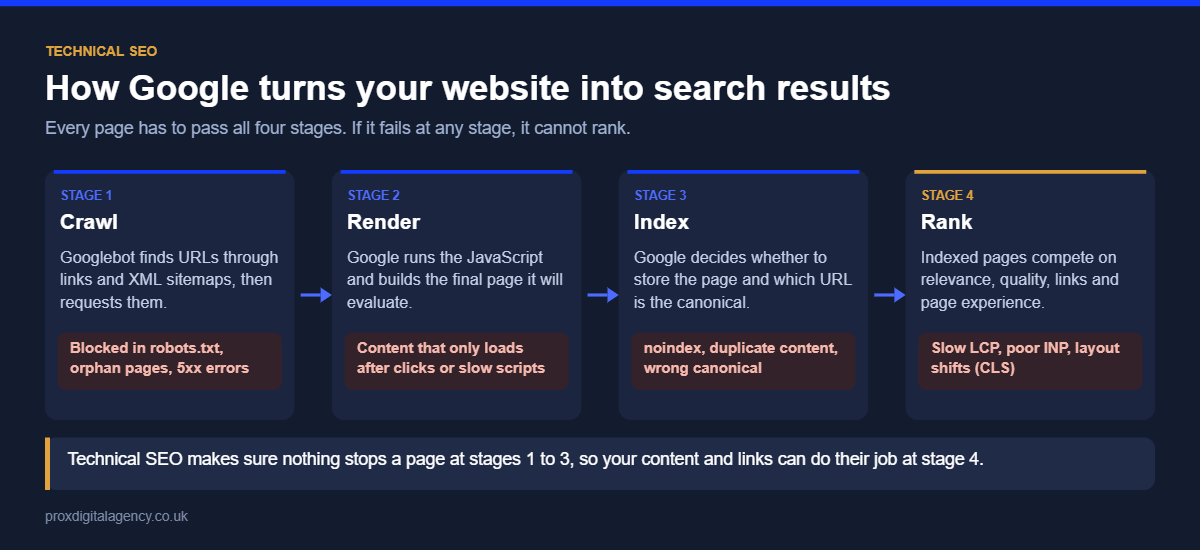
Search engines handle every page in three stages. Crawling is discovery: bots follow links, sitemaps and other signals to find URLs. Rendering is when the search engine loads the page, including any JavaScript, to see the final content. Indexing is when Google processes an eligible page and stores it so it can appear in search results.
The three stages are related but not the same. A URL can be discovered without being indexed, and a page can be indexed without its most important content if rendering fails. Technical SEO therefore asks a few simple questions about every important page:
- Can search engines discover the URL?
- Are crawlers allowed to access it?
- Does it return the correct HTTP status code?
- Is the important content available once the page renders?
- Is another URL being treated as the canonical version?
- Do internal links show search engines that the page matters?
Google Search Console shows how Google is processing your pages. If the Page Indexing report is flagging problems, our guide to common Google Search Console errors explains what each one means and how to fix it.
Robots.txt and XML Sitemaps
Two files shape how search engines crawl your site. robots.txt sits at the root of your domain and tells crawlers which paths they may or may not request. It controls crawling, not indexing: a blocked URL can still appear in search results if other pages link to it, so use a noindex tag on pages you want kept out of the index and leave those pages crawlable.
An XML sitemap lists the URLs you want search engines to find and consider for indexing. Keep it clean: include only canonical, indexable pages that return a 200 status, and remove redirected, broken and noindexed URLs. Submit the sitemap in Search Console and check its status after every major release.
A single wrong line in robots.txt can block an entire site. On a site we work on, a deployment briefly blocked crawling for two days and organic impressions dropped sharply until the file was corrected, which is why robots.txt should be checked after every release.
HTTP Status Codes and Redirects
Every URL returns a status code that tells search engines what happened. The ones that matter most for SEO are:
Avoid redirect chains, where one URL redirects to another that redirects again. Each extra hop slows users down and wastes crawling. When URLs change at scale, during a redesign or CMS move for example, follow our SEO website migration checklist so redirects, canonicals and internal links are updated together.
Build a Search-Friendly Site Architecture
Site architecture is how your pages are organised and connected. A service website might follow Homepage → Services → Individual service → Supporting articles. An ecommerce site usually follows Homepage → Category → Subcategory → Product. Whatever the structure, important pages need clear paths leading to them, ideally within three or four clicks of the homepage.
Internal links do most of the work. They help visitors move between related information, give search engines more routes to discover pages, and show how broad topics connect to more specific content. Pages with no internal links pointing to them, known as orphan pages, are hard to discover and rarely rank well. Plan architecture when a site is designed, not months after launch when a ranking problem appears.
HTTPS and Site Security
HTTPS is a confirmed, if small, ranking signal, and browsers flag HTTP pages as “Not secure”, which damages trust. Make sure every version of your site (http, https, www and non-www) redirects to one secure version, that internal links and canonical tags use that version, and that no page loads insecure “mixed content” such as images over HTTP.
Mobile-First Indexing
Google now crawls and indexes websites using the mobile version of each page. If your mobile layout hides content, drops structured data or removes internal links that appear on desktop, Google works from the reduced version. Check that the mobile and desktop versions carry the same main content, headings, links, metadata and schema, and test key templates on real phones as well as in browser tools.
Core Web Vitals and Website Performance
Website performance affects how quickly and smoothly people can use a page. Common causes of slow pages include oversized images, unnecessary JavaScript, third-party scripts, slow server responses and poor caching.
Google measures real-user experience with three Core Web Vitals:
INP replaced First Input Delay (FID) as a Core Web Vital in March 2024, which made heavy JavaScript a bigger performance issue. Don’t turn this into a race for a perfect testing-tool score: the goal is to fix the problems real users experience. Our Core Web Vitals guide explains each metric in depth, and our website performance optimisation guide covers speed and delivery across the whole site.
Is something stopping Google from crawling or indexing your site?
Our technical SEO team will check your crawlability, indexing, redirects and Core Web Vitals and send you a short list of what to fix first, free.
Get a free technical SEO reviewSee our technical SEO services →
Schema Markup and Structured Data
Schema markup is structured data that describes the content and entities on a page in a machine-readable format: products, organisations, articles, breadcrumbs, events and more. It helps search engines interpret information more precisely and can make pages eligible for rich results, but it does not raise rankings on its own and it must match the content users can see.
Implementation gets technical once several schema types, templates and validation errors are involved. Our guide to schema markup explained, with JSON-LD examples covers the practical side, from choosing types to testing them.
JavaScript Rendering: React and Next.js
Modern websites rely heavily on JavaScript. Frameworks such as React and Next.js create fast, interactive experiences, but the page a user sees in the browser is not always identical to what a search engine receives. If essential content, links or metadata depend on JavaScript running, you need to decide how those elements are rendered: server-side rendering, static generation, client-side rendering or a mix.
Our JavaScript SEO guide for React and Next.js websites goes deeper into rendering, crawling and indexing, and how to check what Google actually sees.
Duplicate URLs and Canonical Tags
Websites often create several URLs with the same or very similar content. Tracking parameters, sorting options, product variations, filter combinations, HTTP and HTTPS versions and alternative navigation paths are the usual causes. Duplicates are not automatically a problem; the problem starts when search engines receive mixed signals about which URL should represent the content.
Canonical tags indicate your preferred URL, but they only work as part of a consistent setup. Internal links, XML sitemaps, redirects and canonical tags should all point to the same version. Google’s guidance on consolidating duplicate URLs explains the signals it uses.
Faceted Navigation on Ecommerce Websites
Filters are useful for shoppers, who narrow products by brand, size, colour, material, price or availability. Technically, though, every combination can generate a new URL, and a large store can end up with millions of low-value, near-duplicate pages competing for crawl attention.
Blocking every filtered page is not the answer either, because some combinations, such as “black running shoes”, have real search demand. Our faceted navigation SEO guide explains how to decide which filter pages deserve to rank and how to control the rest.
Crawl Budget and Log File Analysis
Search engines do not spend the same amount of time on every URL. For most small websites crawl budget is not a priority, but for very large or fast-changing sites inefficient crawling becomes a real problem. Server logs give you the evidence: an SEO crawler shows what it can access, while logs show which URLs Googlebot actually requested, how often, and what status codes it received.
Our guide to log file analysis for SEO covers crawl budget, server logs, tools and how to find and fix crawl waste.
Hreflang for International Websites
A brand selling across the UK, US, UAE and Australia can have four English-language pages for the same service, each with different prices, terminology and contact details. Hreflang annotations tell search engines which version is intended for which audience. The common mistakes are incorrect language or country codes (en-UK instead of en-GB), missing return links and annotations pointing to redirected URLs.
Our hreflang tags guide walks through a four-market setup step by step, including how hreflang and canonical tags work together.
Headless Websites
A headless website separates the content management system from the frontend users see, with content delivered through an API. That flexibility is valuable, but having an SEO field in the CMS does not mean the frontend outputs it. Titles, meta descriptions, canonicals, structured data, redirects, XML sitemaps, internal links and rendering all need to be built into the frontend from the start.
Our headless SEO guide explains how to rank a headless CMS or API-driven website.
Technical SEO for SaaS Websites
Technical SEO for SaaS is particularly complex because one domain often holds marketing pages, the application itself, documentation, integrations and dynamically generated pages, sometimes built on different technologies. A typical example: the marketing site runs on WordPress, the help centre on a third-party platform on a subdomain, and the logged-in app on a JavaScript framework. Without clear rules, Google can end up indexing app screens and duplicate documentation versions while the product pages that drive sign-ups are crawled rarely.
For SaaS sites, review JavaScript rendering, documentation architecture, subdomains versus subdirectories, duplicate URLs, internal linking from docs to product pages, page performance and indexation rules. Prioritise by business impact: an indexing issue on fifty commercial pages matters more than a minor fix on hundreds of low-value URLs.
How to Build a Technical SEO Strategy
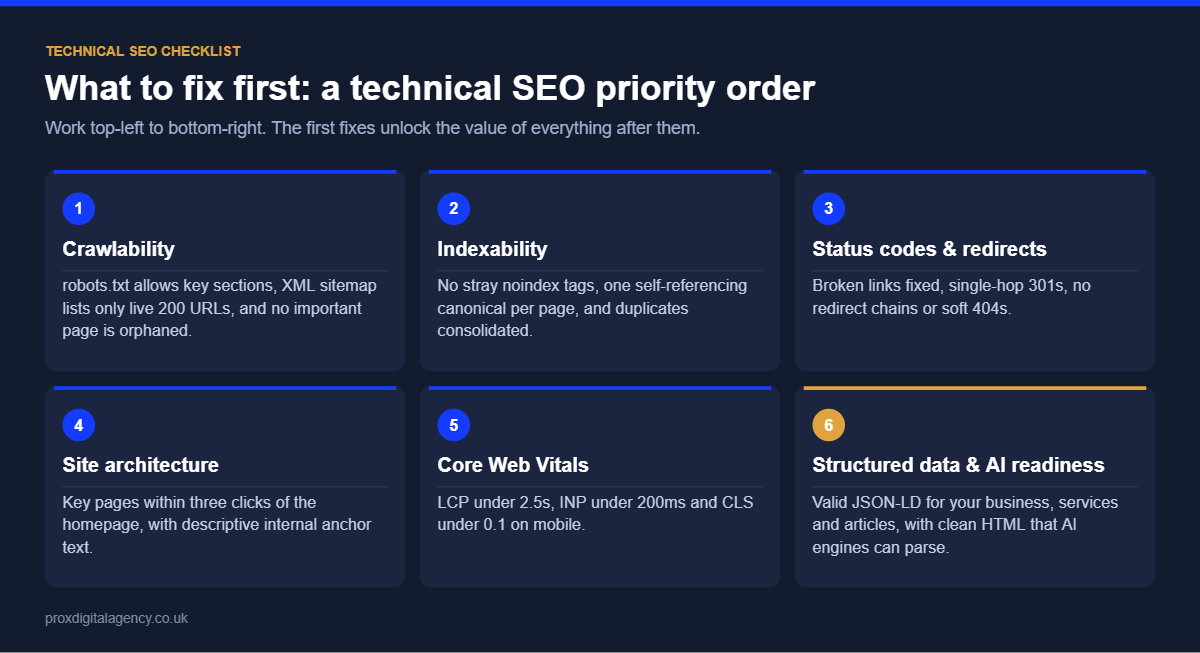
A good technical SEO strategy is not a long list of errors exported from a tool. Issues have very different impacts, so work through four stages:
- Discover: use crawling tools, Google Search Console, analytics, server logs and manual checks to find potential problems.
- Diagnose: understand why each issue exists. A duplicate content problem might come from the CMS, ecommerce filters, internal linking or URL parameters.
- Prioritise: weigh the scale of the issue, the importance of the affected pages, the likely SEO impact and the development effort.
- Implement and monitor: work with developers to deploy the fix, then confirm it works in the live site and in Search Console.
A simple scoring table keeps prioritisation honest:
For a full health check, our technical SEO audit guide walks through the audit process, and our SEO checklist for a new website launch covers what to check before a new site goes live.
Technical SEO Tools
You don’t need a large stack to start. These tools cover most technical SEO work:
- Google Search Console: indexing, crawl stats, Core Web Vitals and URL Inspection, straight from Google.
- Screaming Frog SEO Spider: crawls your site like a search engine and finds broken links, redirects, duplicate titles and canonical issues.
- PageSpeed Insights: real-user Core Web Vitals data plus lab diagnostics for any URL.
- Ahrefs or Semrush Site Audit: scheduled crawls and issue tracking over time.
- Google Rich Results Test and the Schema Markup Validator: structured data testing.
- A log file analyser: shows what search engine bots actually crawl on large sites.
What Does Advanced Technical SEO Look Like in 2026?
Advanced technical SEO goes well beyond broken links and sitemaps. On complex websites, SEO specialists work with developers, UX, content and data teams on rendering, server logs, automated internal linking, structured data systems, large-scale indexation controls and technical quality assurance before every release.
Site structure now matters beyond traditional search. Businesses are working out how to make their content understandable to AI systems and agents, from Google’s AI Overviews to ChatGPT and Perplexity. Our guide to structuring your website for AI agents and answer engines covers the practical steps, and llms.txt explained looks at the proposed llms.txt convention and whether you need it.
None of this replaces the fundamentals. AI systems still rely on accessible content, sensible architecture, crawlable links, clear indexation signals and reliable pages.
Technical SEO Checklist
Use this as a quick health check for any website:
- Important pages are indexable and appear in the Page Indexing report as indexed.
- robots.txt does not block important pages, CSS or JavaScript.
- The XML sitemap lists only canonical, indexable 200-status URLs and is submitted in Search Console.
- Every site version redirects to one HTTPS version.
- No internal links point to redirects or 404 pages.
- Each page has a unique title tag, meta description and one H1.
- Canonical tags point to the correct URL and match internal links and the sitemap.
- Mobile pages carry the same content, links and structured data as desktop.
- Core Web Vitals pass for most real users (LCP, INP and CLS).
- Important content is visible in the rendered HTML, not only after user interaction.
- Structured data validates and matches what users see.
- Hreflang, if used, has correct codes, self-references and return links.
Technical SEO Is an Ongoing Process
Technical SEO is not something you complete once and forget. New pages are published, developers release features, products are removed, URLs change, scripts and plugins are added, international sections launch and ecommerce filters expand. Each change can affect how search engines access and understand the website.
For UK businesses, a sustainable technical SEO strategy combines regular monitoring, careful implementation and close collaboration between SEO, content, design and development teams. The aim is not technical perfection for its own sake. It is a website where important content is discovered, processed and understood efficiently, so technical problems never hold back the rest of your organic search strategy.
If you want an expert view of where your site stands, our technical SEO services start with a detailed audit and a prioritised plan your developers can act on. You can also book a free strategy call.
Prox Digital Agency
Find out what is holding your website back
Send us your website address and we will run a free technical SEO review covering crawling, indexing, site speed, Core Web Vitals and structured data. You get a prioritised fix list your developers can start on straight away.
Frequently Asked Questions
What is technical SEO?
Technical SEO is the work that helps search engines crawl, render, understand and index your website. It covers site architecture, robots.txt, XML sitemaps, status codes, page speed, mobile usability, canonical tags, structured data, JavaScript rendering and international targeting, so your content can compete in search results.
What is the difference between technical SEO and on-page SEO?
Technical SEO makes sure search engines can access and process your site, for example crawling, indexing, speed and rendering. On-page SEO improves the content on each page, such as headings, copy, title tags and internal links. Both are needed: strong content cannot rank if it cannot be indexed.
How often should you check technical SEO?
Review Google Search Console weekly and run a full technical crawl at least monthly. Also check after every major release, redesign, CMS change or migration, because most technical problems are introduced by site changes. Large or fast-changing sites benefit from automated monitoring and alerts.
Can I do technical SEO myself?
Yes, for the basics. With Google Search Console, a crawler such as Screaming Frog and PageSpeed Insights you can fix broken links, redirects, sitemaps and missing metadata. JavaScript rendering, crawl budget, faceted navigation and international setups usually need an experienced technical SEO specialist working with developers.
What are the most important technical SEO factors in 2026?
The most important factors are indexability, crawlable site architecture, correct canonical and status code signals, mobile-first content parity, Core Web Vitals (especially INP), reliable JavaScript rendering and accurate structured data. Clean technical foundations also help AI search systems understand and cite your content.
How long does technical SEO take to show results?
Fixes that unblock indexing, such as removing an accidental noindex or robots.txt block, can show results within days of Google recrawling. Broader improvements to architecture, speed and crawl efficiency usually take one to three months to show their full effect on rankings and traffic.


 Maryam Basit, London
  10 mins
How Much Does Generative Engine Optimisation (GEO) Cost in the UK in 2026?
Google Business Profile Optimisation: The 2026 Checklist

Digital PR for SEO: How to Earn Links Journalists Actually Want

E-E-A-T in 2026: How to Prove Experience, Expertise, Authority and Trust
llms.txt Explained: Should Your Website Have One in 2026?

Perplexity Optimisation: How to Become a Cited Source

Prox Digital Agency Expands Its Generative Engine Optimisation Practice for Global Businesses

How to Choose a Professional SEO Company: 10 Questions to Ask