Image SEO: Alt Text, File Names and Formats That Help Pages Rank
Open almost any slow website and you will often find the same culprit: an image called “IMG_2231.png”, with no alt text and a file size of 3 MB. That one file hurts accessibility, page speed and search visibility. The good news is that the fixes are quick.
Here’s how image SEO plays out on a real page. We’ll cover alt text, file names, formats and speed. Images are only one piece of the puzzle, though. If you’re also tuning titles, headings and copy on the same page, our complete guide to on-page SEO shows how it all fits together.
Let’s get started!
Image SEO at a Glance
Short on time? Here’s the whole topic in one table.
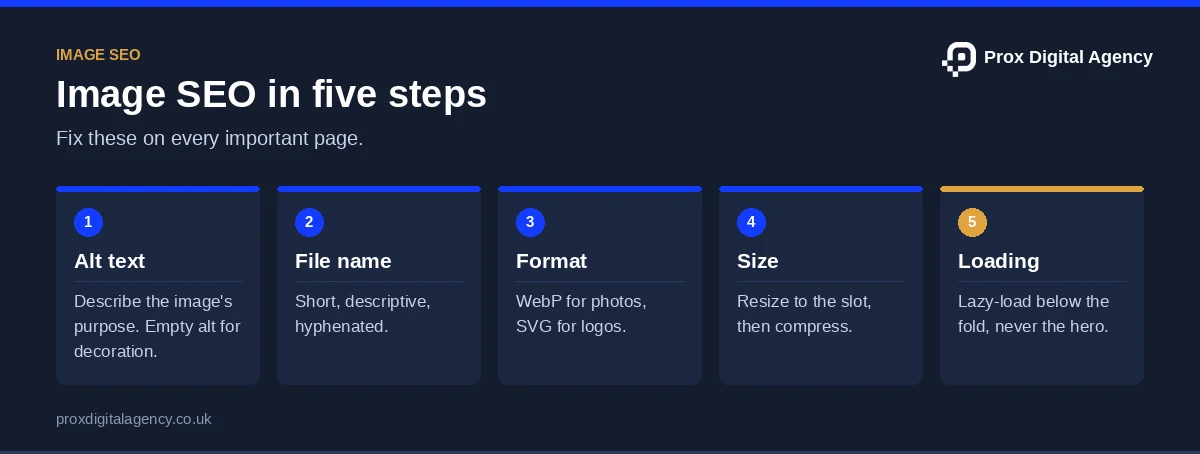
Think of images as supporting evidence on a page. A screenshot proves your feature works. A diagram explains your setup.
Now let’s explore each row with examples.
Image Alt Text SEO: Match Your Alt Text to the Image’s Job
Good alt text starts with one question: what is this image doing on the page? The answer then decides what you write.
Most alt text problems come from treating every image the same. A product shot of a laptop needs a clear description. In contrast, a decorative divider needs nothing at all.
Try this on a router comparison page. The photo of each router gets its model and a key feature. The icon next to “Wi-Fi 6” gets empty alt text, because the label already says it.
In short, that’s the core of image alt text SEO: create meaningful alt text descriptions for relevant images and avoid writing them for decorative images. The W3C’s alt text decision tree is a quick way to decide.
Image Alt Text and File Name Best Practices for SEO
File names should consist of a few descriptive words separated by hyphens, as Google’s image SEO best practices recommend. Do not engage in keyword stuffing, and use null alternative text for images used just for decoration.
Let’s rebuild a bad example. For instance, imagine a status page for a cloud hosting company.
The “before” has a throwaway file name and stuffed alt text. The “after” says exactly what the image shows.
Follow these habits:
- Use hyphens, not spaces or underscores. Search engines read hyphens as word breaks.
- Keep names short. Three to five words work well.
- Rename before upload. Changing a live file name later can break links.
- Write alt text for this page. The same screenshot may need different alt text elsewhere.
- Add a keyword only if it fits. If it feels forced, leave it out.
File names are a small clue. However, alt text is the bigger one. So together they give search engines clear context.
How to Optimise Alt Text for Accessibility and Search Visibility
Alt text exists to describe images for people who cannot see them, including screen reader users. Also, keep it direct, concise and natural. That serves accessibility first. And because search engines read the same text, it also supports visibility.
Also, use the screen reader test. Close your eyes and listen to your page read aloud. Ask three things:
- Do I understand what the image adds?
- Is anything repeated from the nearby text?
- Does it sound like a person wrote it?
Linked images need extra care. If the icon leads directly to the pricing page, then the alt tag must read “Pricing” rather than “Dollar Icon”. The text accompanying the icon may be fully descriptive, hence no need for further elaboration in the alt text.
Which Image Format Should You Use?
Pick the format by asking what the image is.
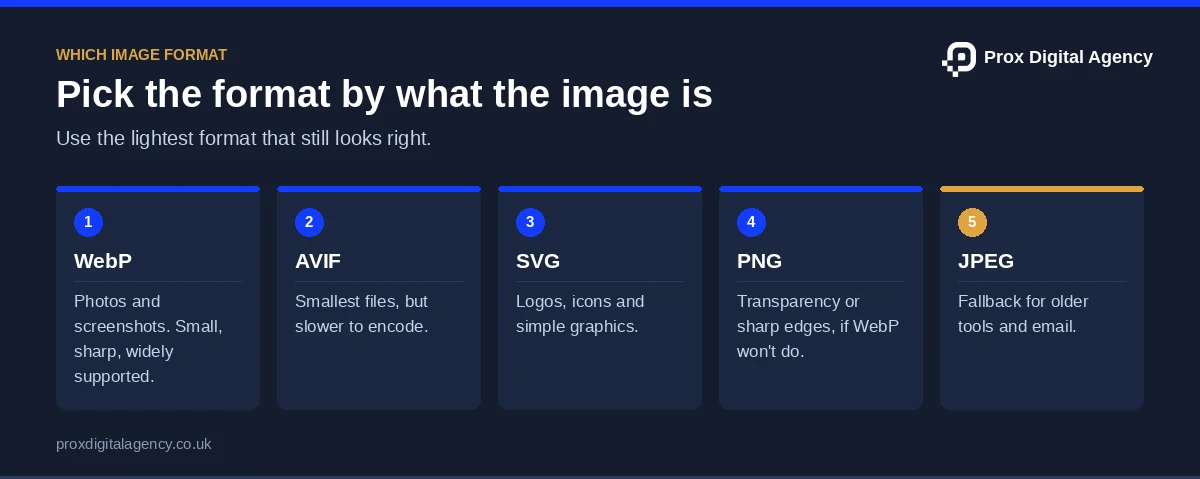
- A photo or screenshot? Also, use WebP. It’s small, sharp and widely supported.
- Need the smallest possible file? Try AVIF. It often beats WebP, but encoding is slower and support is less universal.
- A logo, icon or simple graphic? Also, use SVG. It stays crisp at any size.
- Need transparency or sharp edges? PNG works, though WebP often does it in less space.
- Need a fallback? Also, keep JPEG or PNG for older tools.
A SaaS homepage uses an SVG logo, WebP product screenshots and a JPEG fallback for an old email client. Each image gets the lightest format that still looks right. Every infographic on this blog, for example, is a WebP file with a descriptive file name and alt text.
Also, don’t convert blindly. Then compare the result side by side. A badly exported WebP can look worse than a careful JPEG.
Finally, always keep your original files. You can re-export them later in a better format.
Are heavy images slowing your site?
Send us your top page. We will check every image for alt text, file name, format and weight, and tell you which fixes will speed it up most, free.
Stop Images Slowing Your Site Down
Images are often the heaviest files on a page. Also, our guide to reducing website load time covers the other causes. That hurts speed, and speed shapes how people feel about your site. Strong image SEO treats file weight as part of the job.
Also, use this short routine:
- Resize first. If an image shows at 600 pixels wide, don’t upload 4,000.
- Compress next. Tools like Squoosh or TinyPNG trim file size with little visible loss.
- Set width and height. The browser then reserves space and the page won’t jump.
- Serve responsive sizes. The srcset attribute lets phones download smaller versions.
- Lazy-load everything else, but not the hero image. Lazy-loading the largest image above the fold delays Largest Contentful Paint.
For example, imagine a SaaS homepage with a 2 MB hero screenshot. Visitors stare at a blank space, and the page’s load time drags. Shrinking that one image can improve your Core Web Vitals, especially Largest Contentful Paint (LCP), while setting width and height protects Cumulative Layout Shift (CLS).
Have hundreds of images to fix? Picture a London online shop selling laptops and accessories. Doing that by hand could take weeks, so a repeatable process matters. Prox’s on-page SEO services in London can audit the whole library and set up a repeatable process.
Run a 10-Minute Image Audit
Want to check your own site? Pick one important page and run this audit:
- List every image. Also, use your browser’s inspect tool or a crawler like Screaming Frog.
- Check alt text. Is it missing, stuffed or generic?
- Check file names. Rename any camera codes or “final-v2” leftovers.
- Check file weight. Flag anything over what the slot needs.
- Check loading. Make sure the hero image isn’t lazy-loaded.
Then fix the worst offenders first. Do this for your top pages, and your image SEO improves page by page. Then run the rest of our on-page SEO checklist on the same page.
Make Every Image Work Harder for SEO
Image SEO is not about adding keywords to every image. It is about using descriptive file names, writing meaningful alt text and choosing formats that keep pages fast. Good image alt text SEO makes content more accessible to people using screen readers while helping search engines understand your images.
At Prox Digital Agency, we treat image optimisation as part of a wider on-page SEO strategy. From auditing image files and improving alt text to fixing performance issues, we make sure every detail supports your page’s visibility and user experience. Get in touch with Prox Digital Agency to make your images work harder for both users and search engines.
Image SEO FAQs
How long should alt text be?
There’s no official limit. Many people aim for roughly 125 characters or fewer, since some older screen readers cut off longer text. Say what matters in as few words as you can.
Should I put keywords in alt text?
Only when they fit naturally. If the image really shows “a Wi-Fi 6 router”, say so. Never add lists of keywords. That harms accessibility and can look spammy.
Does every image need alt text?
Every meaningful image needs it. Purely decorative images should have an empty alt attribute so screen readers skip them. Don’t leave the attribute out entirely, because some tools then read the file name aloud.
What image size is best for a web page?
Match the size to where it displays. A full-width hero may need around 1,600 pixels wide. A small card image may need 400. Then compress it. Then check the result in PageSpeed Insights.
Do CSS background images need alt text?
CSS backgrounds don’t take alt text. So they’re best used for decoration. If an image carries real information, put it in the HTML with an img tag and alt text instead.
Prox Digital Agency · On-Page SEO
Make every image work harder for SEO
We audit your image library, fix alt text and file names, convert and compress files and set up a process so new images are right first time.

 Muhammad Bilal, London
 8 mins
Header Tags for SEO: How to Structure H1 to H6 (With Examples)
Title Tags and Meta Descriptions: How to Write Them for Higher Click-Through Rates
SEO Copywriting: How to Write Pages That Rank and Convert
On-Page SEO Checklist: 27 Checks to Run Before You Publish Any Page

On-Page SEO: The Complete Guide to Optimising Every Page for Google and AI Search (2026)
How to Get More Google Reviews (and Handle Negative Ones) Without Hurting Your Rankings

Local SEO for Law Firms: How UK Solicitors Can Win More Local Enquiries

Local SEO for Dentists and Private Clinics: How to Win Patients Searching Nearby