Schema Markup Explained: A Practical Guide for UK Businesses (with JSON-LD Examples)
Search engines can read the words on your website, but understanding exactly what those words represent is a different challenge. Is a number a product price or just a number? Is a name a person, an organisation or an author? Is the page about a product, an event or an article?
Schema markup provides that context. By adding structured information to your pages, you describe your content in a format search engines process explicitly, and eligible pages can qualify for enhanced search appearances such as product prices, review stars and breadcrumbs.
Schema is also widely misunderstood. It is not a shortcut to higher rankings, and adding as many types as possible does not improve SEO. This guide explains what schema markup is, how it works, what it does and doesn’t do for SEO, how to add it with JSON-LD (with copy-ready examples), and how to test it with a schema markup validator before it goes live.
What Is Schema Markup?
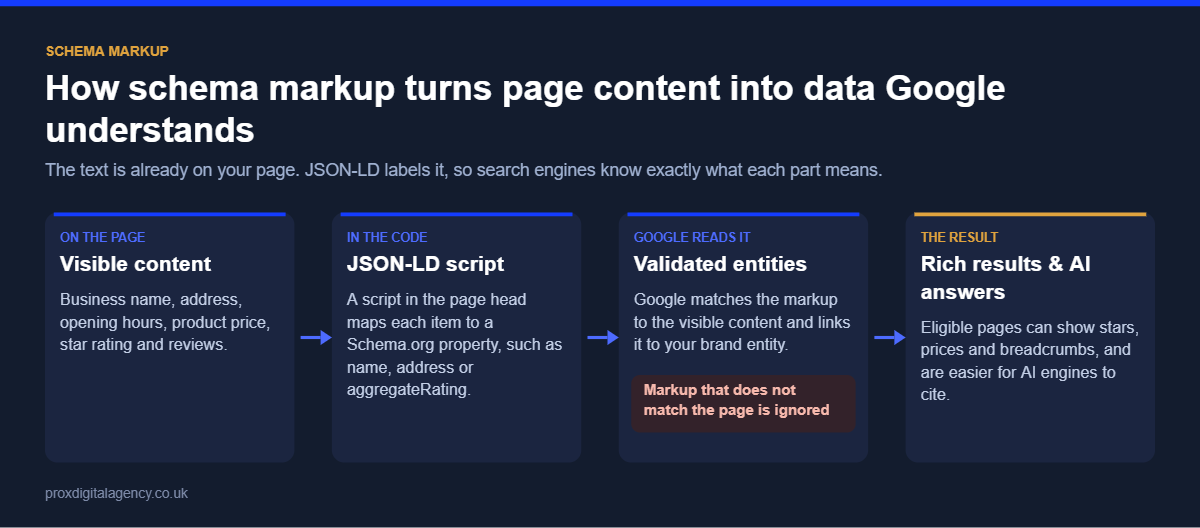
Schema markup is structured data added to a webpage to help search engines understand the meaning and context of its content. It uses a shared vocabulary from Schema.org to describe entities and information in a standard way.
Imagine a product page showing “£149”, “In stock” and “4.7 out of 5”. A visitor understands these values from the design around them. Structured data states explicitly that they are the product’s price, availability and average rating. The same principle applies to products, organisations, people, articles, breadcrumbs, events, local businesses, recipes and videos.
Schema adds a machine-readable layer to content that is already on your page. It does not replace the visible page; it clarifies what each piece of information on it represents.
How Does Schema Markup Work?
Schema markup pairs information with defined properties. A product page shows the product name, price, brand, availability and description; Product structured data represents those same details as named properties that search engines process alongside the page.
There are three formats: JSON-LD, Microdata and RDFa. Google recommends JSON-LD for most sites because the data sits in a single script block instead of being woven through the visible HTML. That makes it easier to implement and maintain, especially when schema is generated automatically across page templates.
Schema Markup Examples Using JSON-LD
Here are four common examples you can adapt. Replace the values with your own, and only include properties that match what users can see on the page.
Product schema example
<script type="application/ld+json">
{
  "@context": "https://schema.org",
  "@type": "Product",
  "name": "Example Office Chair",
  "image": "https://www.example.co.uk/images/office-chair.jpg",
  "description": "An ergonomic office chair with adjustable lumbar support.",
  "sku": "CHAIR-001",
  "brand": { "@type": "Brand", "name": "Example Brand" },
  "aggregateRating": {
    "@type": "AggregateRating",
    "ratingValue": "4.7",
    "reviewCount": "128"
  },
  "offers": {
    "@type": "Offer",
    "url": "https://www.example.co.uk/office-chair/",
    "priceCurrency": "GBP",
    "price": "149.00",
    "availability": "https://schema.org/InStock"
  }
}
</script>
This tells search engines the page contains a product called “Example Office Chair”, with its image, brand, SKU, a 4.7 average rating from 128 reviews, and an offer at £149 that is in stock. The key principle is accuracy: if the markup says £149 but the page shows £179, the structured data no longer represents what users see. Generate schema from the same data that populates the page wherever you can.
Organization schema example
Schema.org uses US spelling for its types, so the type is written “Organization” in the code even on a UK website.
<script type="application/ld+json">
{
  "@context": "https://schema.org",
  "@type": "Organization",
  "name": "Example Ltd",
  "url": "https://www.example.co.uk/",
  "logo": "https://www.example.co.uk/logo.png",
  "sameAs": [
    "https://www.linkedin.com/company/example-ltd",
    "https://www.instagram.com/exampleltd"
  ]
}
</script>
LocalBusiness schema example
<script type="application/ld+json">
{
  "@context": "https://schema.org",
  "@type": "Dentist",
  "name": "Example Dental Clinic",
  "url": "https://www.example.co.uk/",
  "telephone": "+44 20 7946 0000",
  "address": {
    "@type": "PostalAddress",
    "streetAddress": "10 Example Street",
    "addressLocality": "London",
    "postalCode": "EC1A 1AA",
    "addressCountry": "GB"
  },
  "openingHours": "Mo-Fr 09:00-18:00"
}
</script>
“Dentist” is a subtype of LocalBusiness. Use the most specific subtype that accurately describes the business, and keep the name, address and phone number identical to your Google Business Profile. Local schema works best as part of a wider local SEO strategy.
BreadcrumbList schema example
<script type="application/ld+json">
{
  "@context": "https://schema.org",
  "@type": "BreadcrumbList",
  "itemListElement": [
    { "@type": "ListItem", "position": 1, "name": "Home", "item": "https://www.example.co.uk/" },
    { "@type": "ListItem", "position": 2, "name": "Office Furniture", "item": "https://www.example.co.uk/office-furniture/" },
    { "@type": "ListItem", "position": 3, "name": "Office Chairs" }
  ]
}
</script>
The last item can omit the URL because it is the current page.
Does Schema Markup Help SEO?
Schema markup supports SEO by helping search engines understand page content and by making eligible pages available for rich results, but it does not directly increase rankings. That distinction matters. Adding a code snippet will not move a page several positions higher; its value is semantic and presentational.
For supported types, valid markup makes a page eligible for richer search appearances, and those can increase click-through rates. Eligibility does not guarantee Google will show the feature every time. Treat schema as part of a broader technical SEO setup, not an isolated ranking tactic. Our complete guide to technical SEO explains how structured data fits alongside crawling, indexing and rendering.
What Are the Benefits of Schema Markup?
The benefits of schema markup depend on your website and the content you mark up, but four apply to most businesses.
1. Clearer context
Structured data describes important information explicitly. Instead of relying only on layout and surrounding text, search engines receive defined properties that say what each piece of information is.
2. Eligibility for rich results
Some schema types make pages eligible for enhanced appearances, such as product prices and availability, review stars, breadcrumbs and event dates. These make a result more informative and more noticeable on the results page.
3. Consistent machine-readable information at scale
Large websites generate hundreds or thousands of pages from templates. Building schema into those templates presents important properties consistently across every relevant page.
4. Entities and relationships
Structured data describes entities such as an organisation, person, product or article and how they relate, for example which organisation publishes an article and who wrote it. Always aim to represent the page more accurately, not to add markup because a type exists.
Which Schema Markup Should Your Business Use?
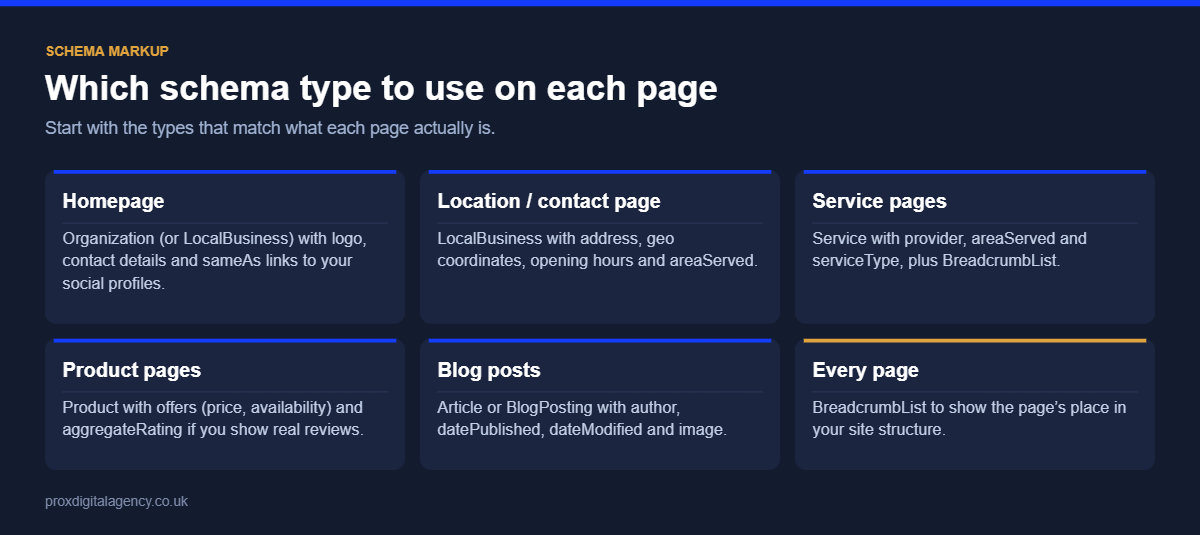
There is no single best schema type. The right markup depends on what actually exists on the page:
- Organization: your company name, website, logo and social profiles, usually on the homepage or About page.
- LocalBusiness (or a subtype): address, phone number and opening hours for businesses serving customers in a location.
- Product: product details, offers, price and availability on ecommerce product pages.
- Article or BlogPosting: headline, author and publication date on editorial content.
- BreadcrumbList: a page’s position in the site hierarchy, useful for sites with clear categories.
- Event: names, dates and locations on genuine event pages.
The rule across all of these is simple: choose schema based on the content that genuinely exists on the page, not on the appearance you want in search results.
What happened to FAQ and HowTo rich results?
In August 2023 Google limited FAQ rich results to well-known, authoritative government and health websites and stopped showing HowTo rich results. FAQ schema is still valid and still helps machines understand question-and-answer content, but most businesses will no longer see FAQ dropdowns in Google results.
How to Add Schema Markup to a Website
Implementation depends on your website’s technology, but the process is the same.
- Identify the page type. Is it a product page, an article, a business page or an event? Starting with the content stops you choosing schema just because a markup type looks attractive.
- Choose the appropriate type. Check the Schema.org vocabulary and, if you want a rich result, Google’s documentation for that feature. Note the required and recommended properties.
- Create the JSON-LD. Build it from information already on the page. On larger sites, generate it through templates instead of maintaining hundreds of manual code blocks.
- Add it to the page. Place the JSON-LD in the page’s HTML inside a
<script type="application/ld+json">block, in the head or the body. - Validate it. Test before and after deployment to catch syntax errors, missing properties and incorrect values.
- Monitor it. Prices change, products sell out, templates are redesigned and plugins update. Structured data must stay aligned with the live page.
Adding schema markup in WordPress
Plugins such as Yoast SEO and Rank Math generate basic schema automatically, including Organization, WebPage, Article and BreadcrumbList. For anything beyond that, such as a specific LocalBusiness subtype or custom product data, add your own JSON-LD through the theme, a dedicated schema field or a structured data plugin, and check that it doesn’t duplicate what your SEO plugin already outputs.
How to Use a Schema Markup Validator or Checker
Two free tools answer slightly different questions:
- Schema Markup Validator: checks that your structured data is syntactically valid and follows the Schema.org vocabulary. Use it for any schema type.
- Google Rich Results Test: checks whether a page or code snippet is eligible for the Google rich results the tool supports, and highlights missing required or recommended properties.
After launch, the Enhancements section of Google Search Console reports errors and valid items for supported schema types across your whole site. Test during development and again on the live page, because templates, JavaScript, CMS behaviour or production data can change the final output: a valid snippet in isolation does not prove the live implementation is correct.
Not sure if your schema markup is working?
We will test your key pages for errors, missing properties and markup that does not match the page, and tell you which schema types you are missing, free.
Common Schema Markup Mistakes
Adding structured data is easy. Adding accurate, maintainable structured data is harder. These are the mistakes we see most often.
- Marking up content that is not on the page. Structured data must represent what users can see. Adding information only to the markup breaks Google’s guidelines and can lead to a manual action.
- Using a type that doesn’t fit. Choose the most specific type that is accurate. Don’t pick a subtype that doesn’t actually describe the business or content.
- Publishing outdated information. Prices and availability change often. If schema is maintained separately from the content source, the two drift apart quickly.
- Assuming valid schema guarantees a rich result. Validation confirms the implementation; it does not oblige Google to display an enhanced result.
- Duplicating markup. Two plugins or a plugin plus a theme can output the same type twice with conflicting values. Check the final page source.
- Adding unnecessary markup everywhere. Focus on information where structured data adds meaningful context and, where relevant, supports a search feature.
Schema Markup and Technical SEO
Schema works best on a technically sound website. Perfect structured data cannot help a page that search engines cannot access or index. Crawlability, indexability, canonicalisation, rendering, internal linking, performance and structured data need to work together, not as unrelated tasks. Businesses managing these areas across complex websites often need broader technical SEO services to see how each element affects the others.
Does Schema Matter Beyond Traditional Search?
Structured data makes information explicit and machine-readable, which matters more as websites are read by AI assistants, answer engines and other automated systems. Don’t treat schema as a guaranteed route into AI answers, though: accurate, well-structured content and a reliable technical implementation come first.
For the wider question of making your site easy for automated systems to navigate, see our guide to structuring your website for AI agents, and llms.txt explained for a look at that proposed convention.
A Practical Schema Markup Strategy for UK Businesses
You don’t need to mark up everything at once. Start with the pages and entities that matter most: product and breadcrumb schema across key ecommerce templates, Article and BreadcrumbList for content-heavy sites, Organization and LocalBusiness for service businesses. Then identify your page types, map schema types to each template, generate the markup from reliable data, validate it, deploy it consistently and monitor it for errors.
Good schema markup is not about adding more code. It is about giving machines clear, accurate information about the content your website already provides, and making structured data a useful part of your technical SEO rather than another box to tick.
Prox Digital Agency
Want rich results and AI engines to understand your business?
Send us your website address and we will check your structured data free: which pages have valid schema, which are missing it, and the JSON-LD your developers need to add.
Frequently Asked Questions
Is schema markup a ranking factor?
No. Google has said structured data is not a direct ranking factor. It helps search engines understand your content and can make pages eligible for rich results, which can improve click-through rates. Any ranking benefit comes indirectly, from clearer understanding and more attractive search listings.
What is the best format for schema markup?
JSON-LD is the best format for most websites and the one Google recommends. It sits in a single script block, separate from the visible HTML, so it is easier to add, generate from templates and maintain than Microdata or RDFa.
How do I test my schema markup?
Use the Schema Markup Validator to check the code is valid, and Google’s Rich Results Test to check eligibility for rich results. After launch, monitor the Enhancements reports in Google Search Console, which show errors and valid items across your whole site.
Does schema markup help with AI Overviews and ChatGPT?
Schema makes your content easier for machines to interpret, which supports visibility in AI-driven search, but no structured data guarantees inclusion in AI Overviews or ChatGPT answers. Clear, accurate content, strong authority and a technically sound site matter more.
Why are my rich results not showing?
Valid markup only makes a page eligible. Google may not show rich results if required properties are missing, the markup doesn’t match visible content, the page isn’t indexed, the feature isn’t supported for your site type, or Google decides a plain result is more useful for that search.
Can I add schema markup in WordPress without a plugin?
Yes. You can add JSON-LD through your theme’s templates or a custom field that outputs a script block in the page. Many sites combine both: an SEO plugin for basic schema, plus custom JSON-LD for specific types. Always check the final page source for duplicates.


 Muhammad Bilal, London
  15 mins
Technical SEO: The Complete Guide for UK Businesses (2026)

How Much Does Generative Engine Optimisation (GEO) Cost in the UK in 2026?
Google Business Profile Optimisation: The 2026 Checklist

Digital PR for SEO: How to Earn Links Journalists Actually Want

E-E-A-T in 2026: How to Prove Experience, Expertise, Authority and Trust

llms.txt Explained: Should Your Website Have One in 2026?

Perplexity Optimisation: How to Become a Cited Source

Prox Digital Agency Expands Its Generative Engine Optimisation Practice for Global Businesses