Hreflang Tags: How to Set Up One Brand Across the UK, US, UAE and Australia
One brand. Four markets. Four versions of the same website. The UK audience needs prices in GBP, US customers expect USD and American terminology, UAE visitors need market-specific information, and Australian users should land on content written for Australia.
The challenge is that all four versions are written in English and cover almost identical products or services. So how do you help search engines show the right version to the right audience? With hreflang tags, which create clear relationships between equivalent regional pages.
This guide walks through how to set up hreflang for a brand operating across the UK, US, UAE and Australia: mapping equivalent pages, choosing the right codes, aligning canonical tags, adding x-default, and checking the implementation before and after launch.
The Challenge: One Brand, Four Markets
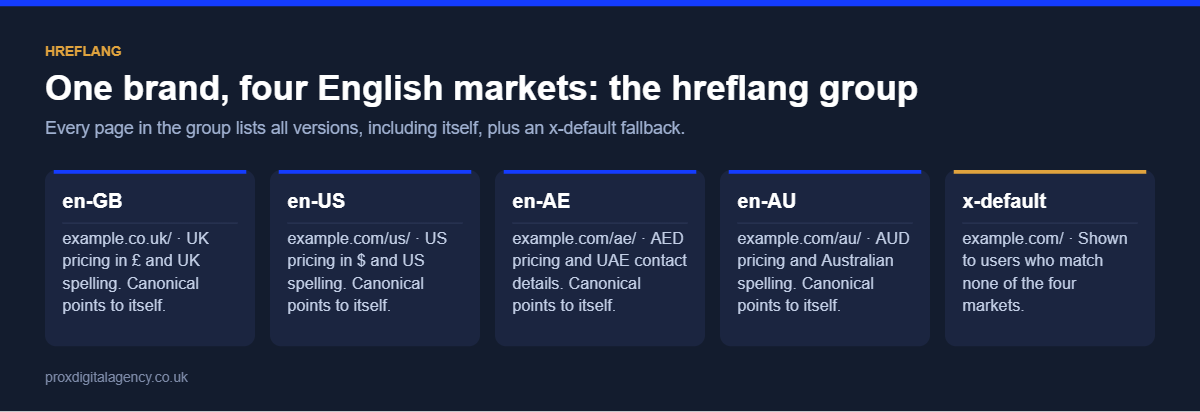
Imagine a business that has expanded into four markets using subfolders on one domain: example.com/uk/, example.com/us/, example.com/ae/ and example.com/au/. The core offering stays the same, but each market has its own requirements:
For users, the goal is simple: show them the version designed for their market. Search engines, however, need signals explaining why these near-identical pages exist and how they relate. Without them, Google may show the UK page to Australian searchers, or treat the four versions as duplicates and pick just one to rank.
What Is Hreflang?
Hreflang is an HTML attribute that tells search engines about alternate language or regional versions of a page. A basic hreflang tag looks like this:
<link rel="alternate" hreflang="en-GB" href="https://example.com/uk/service/" />This says the URL is an English-language page intended for the United Kingdom. Hreflang does not translate or localise content. It tells search engines which existing version is intended for which audience, so the right URL appears in each country’s results. Google’s documentation on localised versions of your pages sets out the full specification.
For how international targeting fits alongside crawling, indexing, performance and site architecture, see our complete guide to technical SEO.
Hreflang Code Rules
Most hreflang errors come from incorrect codes. Keep these rules in mind:
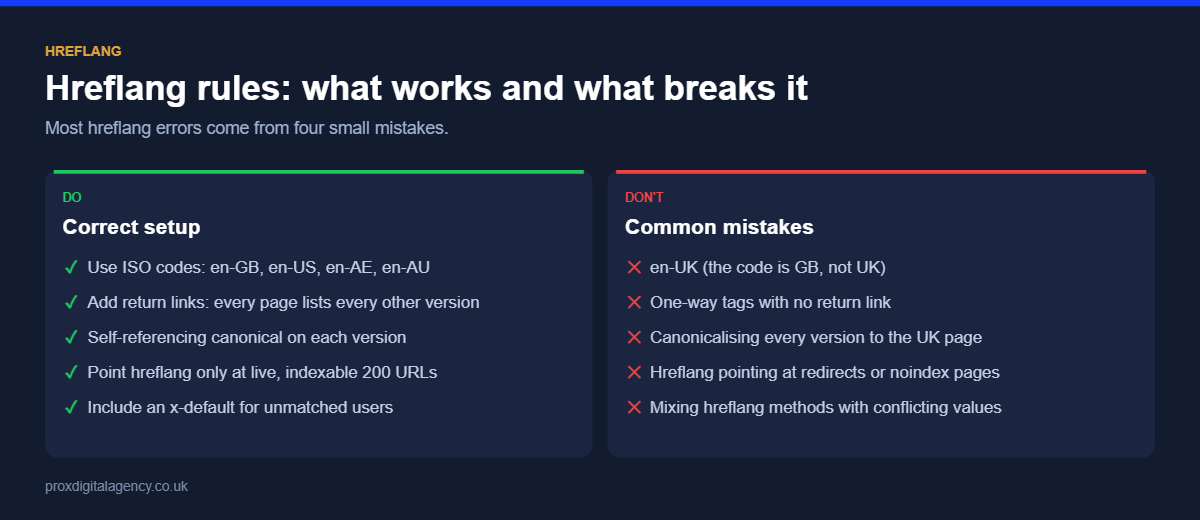
- The language code comes first and uses ISO 639-1 format, for example
en. - The optional region code comes second and uses ISO 3166-1 Alpha-2 format:
GB,US,AE,AU. - The UK is
en-GB, noten-UK. “UK” is not a valid country code and the tag will be ignored. - A region on its own, such as
hreflang="GB", is not valid. You must always include a language. - Codes are not case-sensitive, but
en-GBis the conventional format and easiest to read.
Step 1: Map Equivalent Pages Across Every Market
Before adding any code, identify which pages are genuine regional alternatives. For the service page, the group is /uk/service/, /us/service/, /ae/service/ and /au/service/: four pages offering the same core service to different markets. The same mapping applies across the site, for example /uk/product-a/ ↔ /us/product-a/ ↔ /ae/product-a/ ↔ /au/product-a/.
The key word is equivalent. Never connect a UK service page with an unrelated US service just because both sit in regional sections. The mapping stage also reveals gaps: if a UK page has no Australian equivalent, leave Australia out of that group rather than forcing an unrelated URL in to complete the set. A simple spreadsheet with one row per page and one column per market is the easiest way to build and maintain the map.
Step 2: Build the Hreflang Tags
Once equivalent pages are mapped, create the annotations. For the service page, every version carries the complete set:
<link rel="alternate" hreflang="en-GB" href="https://example.com/uk/service/" />
<link rel="alternate" hreflang="en-US" href="https://example.com/us/service/" />
<link rel="alternate" hreflang="en-AE" href="https://example.com/ae/service/" />
<link rel="alternate" hreflang="en-AU" href="https://example.com/au/service/" />
<link rel="alternate" hreflang="x-default" href="https://example.com/" />
Two rules make the set work.
Include a self-reference
The UK page includes its own en-GB annotation, just as the US, UAE and Australian versions reference themselves. Each page lists every version in the group, including itself.
Include return links
The relationships must work both ways. If the UK page lists the UAE page as an alternate, the UAE page must list the UK page too. In practice, all four pages carry the same five lines. If a return link is missing, Google can ignore the annotation between those two pages.
Step 3: Align Hreflang and Canonical Tags
The relationship between hreflang and canonical tags is the most common source of confusion in hreflang SEO. They do different jobs: a canonical tag indicates the preferred URL among duplicate or very similar URLs, while hreflang identifies alternate language or regional versions.
For genuine regional alternatives, each version should be self-canonical. The UK page carries <link rel="canonical" href="https://example.com/uk/service/" />, the US page points to its own URL, and the UAE and Australian pages follow the same pattern.
Canonical vs hreflang tag: what goes wrong?
Imagine the US page has a canonical pointing to the UK page while its hreflang says it is the US alternative. The signals contradict each other: hreflang says “show this URL to US users”, the canonical says “the UK URL is the real version”. Google usually follows the canonical, so the US page drops out of results and the hreflang group breaks. For a clean hreflang canonical setup, check both systems together, and only ever list canonical URLs in hreflang annotations.
Step 4: Decide Whether You Need x-default
Some visitors won’t match any of the four regional versions: someone searching from Canada or Ireland, for example. If the brand has a global page or country selector, x-default identifies that fallback:
<link rel="alternate" hreflang="x-default" href="https://example.com/" />x-default is not another country or language code. It is simply the page for users who don’t match the versions you have specified. Whether you need it depends on how your website handles visitors outside its main markets, but for most international brands it is worth adding.
Step 5: Choose an Implementation Method
There are three ways to implement hreflang. Use one method consistently rather than mixing them, because duplicate implementations fall out of sync and create errors.
- HTML link tags in the <head> of each page: straightforward for most websites and easy to check in the page source.
- XML sitemaps: useful for large international websites, because all the mappings are managed centrally and page templates stay lighter.
- HTTP headers: mainly for non-HTML files such as PDFs.
In an XML sitemap, each URL entry lists all of its alternates:
<url>
  <loc>https://example.com/uk/service/</loc>
  <xhtml:link rel="alternate" hreflang="en-GB" href="https://example.com/uk/service/" />
  <xhtml:link rel="alternate" hreflang="en-US" href="https://example.com/us/service/" />
  <xhtml:link rel="alternate" hreflang="en-AE" href="https://example.com/ae/service/" />
  <xhtml:link rel="alternate" hreflang="en-AU" href="https://example.com/au/service/" />
</url>
The sitemap must declare the xhtml namespace (xmlns:xhtml="http://www.w3.org/1999/xhtml"), and each regional URL needs its own entry with the same set of alternates.
A note on Bing
Google is the main search engine that uses hreflang. Bing relies more on other signals, such as the content-language meta tag, the HTML lang attribute and the page’s location targeting. If Bing matters to your markets, add lang="en-GB" (and the equivalent for each market) to the <html> element as well.
Step 6: Check the Setup Before Going Live
Adding the tags is not the final step. A hreflang checker finds technical errors at scale. Screaming Frog SEO Spider and Ahrefs Site Audit both report hreflang issues across a full crawl, and free online hreflang testers are useful for spot-checking individual URLs. Look for:
- Incorrect language or region codes
- Missing self-references
- Missing return links
- Alternate URLs that are broken, redirect or are non-canonical
- Incomplete hreflang groups
Automated validation only tells part of the story, because a technically valid relationship can still connect the wrong pages. “UK Service A ↔ US Service B” is formatted correctly but the pages aren’t equivalent. Check the page relationships manually for your key templates before launch. On larger sites this matters even more: one incorrect template rule can affect hundreds of URLs at once.
Is Google showing the wrong country version of your site?
We will crawl your regional pages and check codes, return links, canonicals and x-default, so each market sees the right version, free.
Hreflang Does Not Replace Localisation
Perfect hreflang cannot make up for a poor regional experience. The UK version needs GBP pricing, British spelling and terminology, and UK contact details; the UAE version needs AED pricing, local service details and UAE contact information; the US and Australian versions need the same care. Hreflang tells search engines “this page is intended for this audience”. It doesn’t make the content right for that audience.
This is especially important when every market uses English, because localisation is what gives each version a genuine reason to exist. Research the terms each market actually uses: an international keyword research exercise often shows different search language for the same service in each country.
What Happens When Regional URLs Change?
International websites need extra attention during redesigns and migrations. If example.com/ae/service/ changes to example.com/uae/service/, the hreflang references on the UK, US and Australian pages must change too. Otherwise the group keeps pointing to an outdated, redirected URL, which weakens the whole set.
For every migration, update the chain old URL → new URL → canonical → hreflang group, then check the live annotations again after launch. Our SEO website migration checklist covers the wider process when URLs, platforms or site structures change.
How to Manage Hreflang as the Website Grows
Four pages are easy to manage by hand. Four regional versions of hundreds of services, products and resources are not. At scale, treat hreflang as a mapping system, not a collection of individual tags: map equivalent templates, assign regional URLs, generate annotations automatically, validate, then monitor.
That makes problems easier to trace. If 500 pages contain an incorrect UAE URL because of one template rule, editing 500 pages by hand is not the fix; correcting the rule is. The same approach applies to canonical tags, redirects and other international signals. For businesses with complex regional structures, specialist technical SEO consultancy helps find conflicts between crawling, canonicalisation and international targeting before they cost you visibility.
Clear, machine-readable relationships help other systems too. Our guide to structuring your website for AI agents applies the same thinking to answer engines.
The Final Four-Market Setup
Each regional page references itself and its equivalents, includes return links, uses correct language and country codes, points directly to live canonical URLs, represents genuinely equivalent content, and is checked before and after deployment.
The code is not the hardest part of hreflang. The real challenge is keeping every regional URL and signal aligned as the website grows. Get that right and search engines have a clear picture of which version of your site belongs to each audience.
Prox Digital Agency
Expanding into the US, UAE or Australia?
Send us your website address and the markets you target. We will review your hreflang, canonical and international URL setup free, and show you exactly what to fix before it costs you traffic.
Frequently Asked Questions
What is hreflang used for?
Hreflang tells search engines which language or regional version of a page to show to which users. It is used when the same content exists in several languages, or in one language for several countries, such as separate UK, US and Australian English pages, so each audience sees its own version.
Do I need hreflang if all my sites are in English?
Yes, if you have separate versions for different English-speaking countries. Without hreflang, Google may treat the UK, US and Australian pages as duplicates and rank only one of them everywhere. Hreflang helps each regional version appear in its own market.
What is the correct hreflang code for the UK?
The correct code is en-GB. Hreflang uses ISO country codes, and the United Kingdom’s code is GB, not UK. A tag using en-UK is invalid and will be ignored, which is one of the most common hreflang mistakes on UK websites.
Should hreflang pages be self-canonical?
Yes. Each regional version should have a canonical tag pointing to itself, and hreflang should only reference canonical URLs. If a regional page canonicalises to another market’s page, Google will usually drop it from results and the hreflang group breaks.
What is x-default in hreflang?
x-default is the fallback page for users who don’t match any of the languages or regions you have specified. It usually points to a global homepage or a country selector, so a visitor from an untargeted country lands somewhere sensible.
Does Bing use hreflang?
Bing relies mainly on other signals, such as the content-language meta tag, the HTML lang attribute and location targeting, rather than hreflang. Google is the main search engine using hreflang, so set lang attributes as well if Bing matters to your markets.


 Muhammad Bilal, London
  10 mins
Schema Markup Explained: A Practical Guide for UK Businesses (with JSON-LD Examples)

Technical SEO: The Complete Guide for UK Businesses (2026)

How Much Does Generative Engine Optimisation (GEO) Cost in the UK in 2026?

Google Business Profile Optimisation: The 2026 Checklist

Digital PR for SEO: How to Earn Links Journalists Actually Want

E-E-A-T in 2026: How to Prove Experience, Expertise, Authority and Trust
llms.txt Explained: Should Your Website Have One in 2026?

Perplexity Optimisation: How to Become a Cited Source