Header Tags for SEO: How to Structure H1 to H6 (With Examples)
Your page might have great content. But if the headings are a mess, readers get lost. So do search engines. That’s why header tags matter for SEO. In other words, headings are the table of contents for a page. Good ones help everyone find what they need.
In this guide, you’ll learn what each heading level does and how to structure H1 to H6. Headings are one part of on-page SEO; our complete guide to on-page SEO covers the rest.
Let’s start with the basics.
What Are Header Tags and Why Do They Matter for SEO?
Header tags are HTML tags, from H1 to H6, that mark up the headings on your page. They’re also called heading tags. They also give your content an outline. That helps readers skim, helps screen readers navigate, and helps search engines understand how topics fit together. The W3C’s guidance on headings explains the accessibility side.
They’re a lighter ranking signal than your title tag. Even so, good header tags won’t replace strong content. But clear headings improve usability, and that supports your rankings.
Heading Tags Explained: H1 to H6
Think of a book. The H1 is the title. H2s are chapters, while H3s are sections within a chapter. Here’s every level, using an API documentation page as the example:
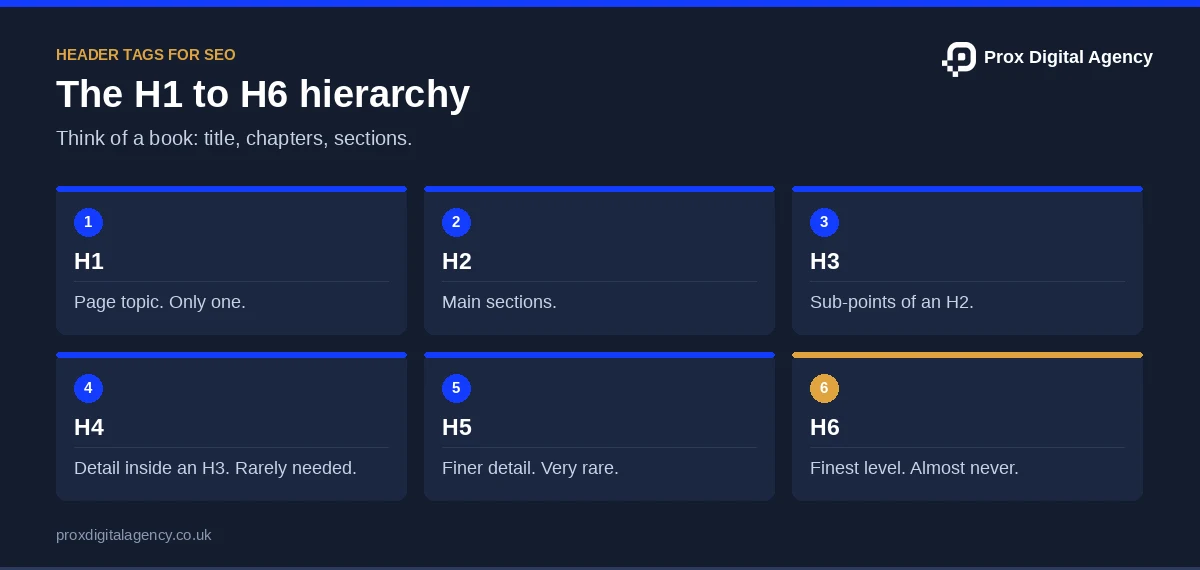
Each level should sit inside the one above it. A reader should understand the whole page by skimming the headings alone. Screen readers also let users jump between headings, so a clear outline makes pages easier to use.
Usually, pages only require H1 to H3 tags. H4, H5, and H6 are used for denser content and are typically needed on technical pages with deep nesting, like lengthy documentation. If you’re reaching H5, check whether the page could be split into two. That’s the best practice for heading tags.
How to Use Header Tags H1-H6 for On-Page SEO
Also, use one H1 for the main topic, H2s for the main sections and H3s for sub-points. Add H4 to H6 only when a section needs more depth. Also, keep the order logical, write clear, descriptive text and never skip levels or use headings just for styling.
Follow these four steps:
- Outline first. Write your H1 and H2s before the body copy. A reader should grasp your argument from the headings alone.
- Make headings specific. Don’t just write “overview.” Write a better heading such as “Set Up Two-Factor Authentication.”
- Add keywords naturally. Also, use your main keyword in the H1 and one or two H2s. Also, use related terms in the rest.
- Check the order. Move down one level at a time. However, going back up is fine.
Say you’re writing a guide to network monitoring tools. Your outline might run:
- H1: Network Monitoring Tools
- H2: Key Features to Compare
- H3: Alerting
- H3: Dashboards
- H2: Key Features to Compare
Simple and scannable.
The same steps work for service pages, blog posts and product pages, because only the headings change. Outline first, then write. It saves rewrites later.
Differences Between H1, H2 and H3 for SEO Hierarchy
The H1 names the whole page. H2s split it into main sections. H3s break each section into smaller parts. For SEO, the H1 sets the main topic, H2s signal key subtopics and H3s add detail. As a result, they form a clear hierarchy.
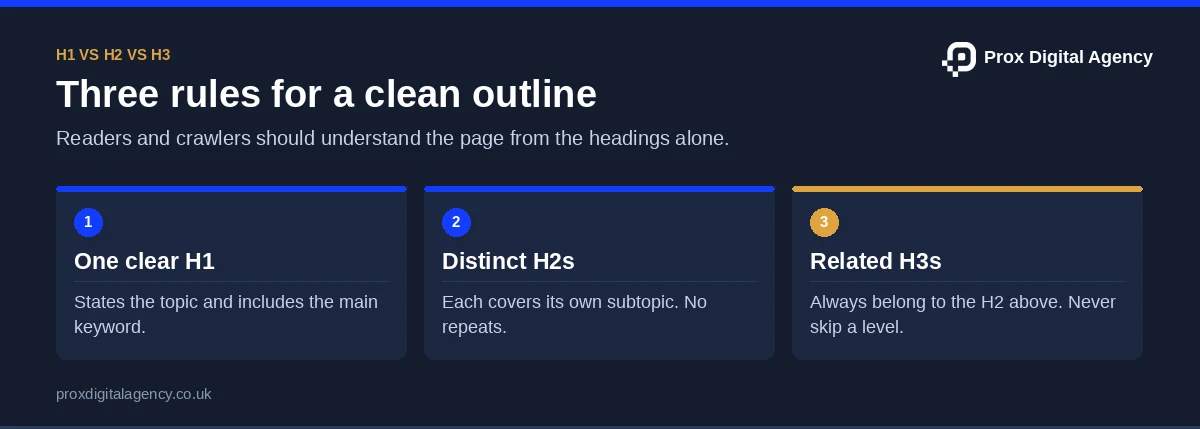
Here’s an example of a nested outline for a cloud backup page:
- H1: Cloud Backup for Small Teams
- H2: How Cloud Backup Works
- H3: Encryption
- H3: Restore Speeds
- H2: Cloud Backup Pricing
- H3: Per-User Plans
- H3: Storage Add-Ons
- H2: How Cloud Backup Works
A few rules keep the hierarchy clean:
- Each H2 should cover a distinct topic. Also, don’t repeat the same idea in two H2s.
- H3s must relate to the H2 above them.
- Don’t make an H3 bigger in scope than its H2.
Break these rules, and the outline gets confusing, so readers and crawlers can’t tell what belongs where.
H1 Tag SEO: Rules for Your Main Heading
Your H1 is your page’s headline. Good H1 tag SEO starts with one rule: state the topic clearly.
- Also, use one H1. Google can handle more, but one is best practice for clarity and accessibility.
- Include your main keyword. Place it naturally, like “Managed Wi-Fi Setup for Offices”.
- Make it match the page. However, don’t promise something the content doesn’t deliver.
Also, keep it short enough to scan at a glance. Keep the H1 near the top of the page, above the main content.
Your H1 doesn’t have to match your title tag word for word, but they should communicate the same topic. For example, say your title tag reads “SEO Services for Small Businesses (2026)” and your H1 says “Why Choose Us”. As a result, readers may feel confused, and Google may rewrite your title. Also, our guide to title tags and meta descriptions explains how to keep both aligned.
Not sure your heading structure is right?
Send us a URL. We will map its H1 to H6 outline, flag skipped levels and template issues, and show you the fixed version, free.
Header Tags for SEO: Before-and-After Example
Here’s a messy outline for a “Cloud Hosting” documentation page, and a fixed version.
What went wrong in the “before” version:
- Two H1s with vague text. “Welcome” says nothing about the page.
- A skipped level. The H4 jumps in before any H2 or H3.
- Vague labels. “Stuff you need” and “FAQ” don’t tell readers what they’ll find.
The “after” version fixes each issue. There’s one clear, optimised H1. The levels step down in order. Finally, every heading says what the section covers.
Another common fix: on a page titled “SaaS Pricing”, the H1 should be about pricing, with plan features and other details below it as H2s and H3s.
This is how header tags for SEO work in practice: small adjustments can improve your page structure without requiring new content. To check your own page, open it in a browser and use an extension that displays the heading hierarchy. If the headings follow a logical order and clearly outline the content, your page structure is in good shape.
We run the same check on our own site. When we audited the heading outline of our page templates in 2026, most of the problems came from the theme templates rather than from the writers’ content. As a result, fixing a template fixed every page built on it.
5 Common Header Tag Mistakes to Avoid
Even tidy sites slip up. Watch for these:
- Using headings for styling. Heading tags are for structure, not looks. Also, use CSS to change size and colour.
- Skipping levels. Jumping from H2 to H4 breaks the outline.
- Vague labels. “Overview” and “Details” tell nobody anything.
- Keyword stuffing. “Cloud Backup, Best Cloud Backup, Cloud Backup UK” looks spammy and reads badly.
- Duplicate headings. Five identical “Features” headings confuse the outline.
However, fixing these across a whole site takes time. For instance, say you run a SaaS site with 400 pages built on old templates. As a result, the same heading problems repeat on every page. Then fix the template, and you fix every page built on it. Getting header tags right at that scale needs a plan and a proper audit. That’s where Prox Digital Agency’s on-page SEO specialists can help. They can audit your templates, fix the patterns and check the results.
Your Header Tag Checklist
Clear headings make pages easier to read, easier to crawl and easier to trust. Before you publish any page, check four things:
- One clear H1 that names the topic. Check your H1 tag SEO basics: keyword, clarity, match with the title tag.
- Logical H2s and H3s with no skipped levels.
- Specific, descriptive wording in every heading.
- Headings styled with CSS, not chosen for size.
Use a consistent heading structure across your website to improve readability, search visibility and user experience. For the full pre-publish routine, run our on-page SEO checklist.
Want expert eyes on your pages? Prox Digital Agency can review your headings and pages. We can refine your site structure, optimise content and build a stronger foundation for organic growth. Get in touch with our team to discuss your SEO goals.
Header Tags FAQs
Can I use more than one H1 on a page?
Technically yes. Google can handle multiple H1s, and HTML5 allows them. But one H1 is still best practice. It’s clearer for readers, screen readers and your own team. Use extra H1s only when a template needs them.
Do header tags directly affect rankings?
Only lightly. Your title tag and content matter more. But clear headings help search engines understand the page, and they improve readability, which supports engagement. Think of them as structure, not a ranking trick.
Should every heading contain my keyword?
No. Use your main keyword in the H1 and one or two H2s. Fill the rest with related terms and natural wording. If every heading repeats the same phrase, the page reads like spam.
Can I change heading styles with CSS without breaking SEO?
Yes. CSS controls how a heading looks, whereas the tag controls its meaning. So keep your H2 as an H2 and restyle it with CSS. Never pick a tag just because of its default size.
Do header tags help with AI search?
They can. Clear headings split your content into labelled chunks. That makes it easier for AI tools to find the section that answers a question. There are no guarantees, but a tidy outline helps.
Prox Digital Agency · On-Page SEO
Fix heading structure across every template
Our on-page SEO specialists audit your templates, fix the heading patterns at source and re-check every page type.

 Muhammad Bilal, London
 7 mins
Image SEO: Alt Text, File Names and Formats That Help Pages Rank
Title Tags and Meta Descriptions: How to Write Them for Higher Click-Through Rates

SEO Copywriting: How to Write Pages That Rank and Convert

On-Page SEO Checklist: 27 Checks to Run Before You Publish Any Page

On-Page SEO: The Complete Guide to Optimising Every Page for Google and AI Search (2026)

How to Get More Google Reviews (and Handle Negative Ones) Without Hurting Your Rankings

Local SEO for Law Firms: How UK Solicitors Can Win More Local Enquiries

Local SEO for Dentists and Private Clinics: How to Win Patients Searching Nearby