JavaScript SEO: How to Get React and Next.js Websites Crawled and Indexed
A React or Next.js website can work perfectly for a user and still create problems for search engines. The page loads, the design looks right, navigation works and the content appears on screen. But the important SEO question is different: what can a search engine actually access, render and index?
Modern JavaScript frameworks give developers enormous flexibility, and they also change how content reaches the browser. If important text, links or metadata depend on JavaScript running correctly, a rendering mistake can change what search engines discover and understand. That is what JavaScript SEO deals with.
This guide explains how crawling, rendering and indexing work on JavaScript websites, the common React and Next.js SEO problems, specific Next.js settings that help, and how to check whether Google can see your content.
What Is JavaScript SEO?
JavaScript SEO is the process of making JavaScript-powered websites easy for search engines to crawl, render, understand and index. Traditional HTML pages return most of their meaningful content in the initial server response. JavaScript-heavy websites often work differently: the browser receives a basic HTML document, then JavaScript generates or updates the page.
That matters because if critical content or links only appear after JavaScript runs, and something stops that process working, search engines receive a different version of the page from the one users see. Good JavaScript and SEO implementation starts with one question: is the content we want indexed reliably available to search engines?
For the wider technical foundation behind crawling and indexation, see our complete guide to technical SEO.
How Does Google Process JavaScript Pages?
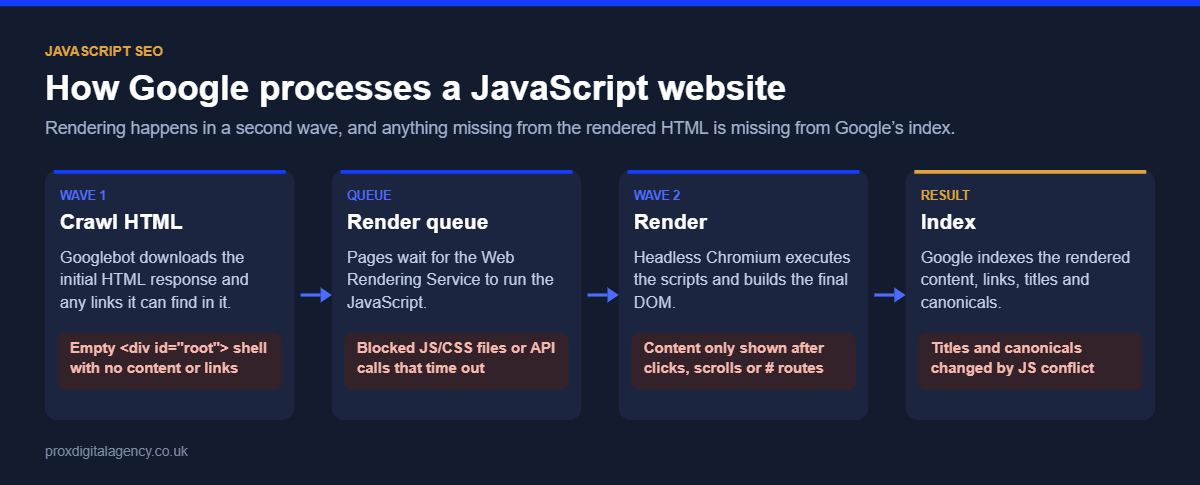
Google handles JavaScript pages in three stages, described in its JavaScript SEO basics documentation.
- Crawling: Googlebot discovers and requests a URL through internal links, XML sitemaps or external links, and reads the initial HTML.
- Rendering: if the page relies on JavaScript, it is queued for rendering. Google’s Web Rendering Service uses an up-to-date (“evergreen”) version of Chromium to run the scripts and build the final page. Rendering can happen some time after crawling.
- Indexing: Google processes the rendered content and, if the page is eligible, indexes it.
Problems appear in the rendering stage when essential resources are blocked or fail, scripts need user interaction, or content loads too slowly. A crawlable URL does not automatically mean everything a user sees will be indexed, which is why testing the rendered output matters. Two behaviours catch many sites out: Googlebot does not click buttons, and it does not scroll the way a user does, so content that only appears after “Load more” or infinite scroll needs crawlable, paginated URLs.
Why React SEO Can Become Complicated
React itself does not make a website bad for SEO. The challenge is how the website renders its content. A React application built with client-side rendering often returns little more than <div id="root"></div> in its initial HTML and then uses JavaScript to build the page. For a user on a fast device that happens quickly. For SEO, we need to know whether the important content, links and metadata are still reliably available when Google crawls and renders the page.
A common React Router issue is hash-based routing. URLs such as /#/services are not treated as separate pages, because Google generally ignores everything after the #. Use real paths such as /services/ with the History API instead. This is why React SEO should be planned during development, not repaired after launch.
Client-Side vs Server-Side Rendering
The rendering approach has a big effect on SEO with React.
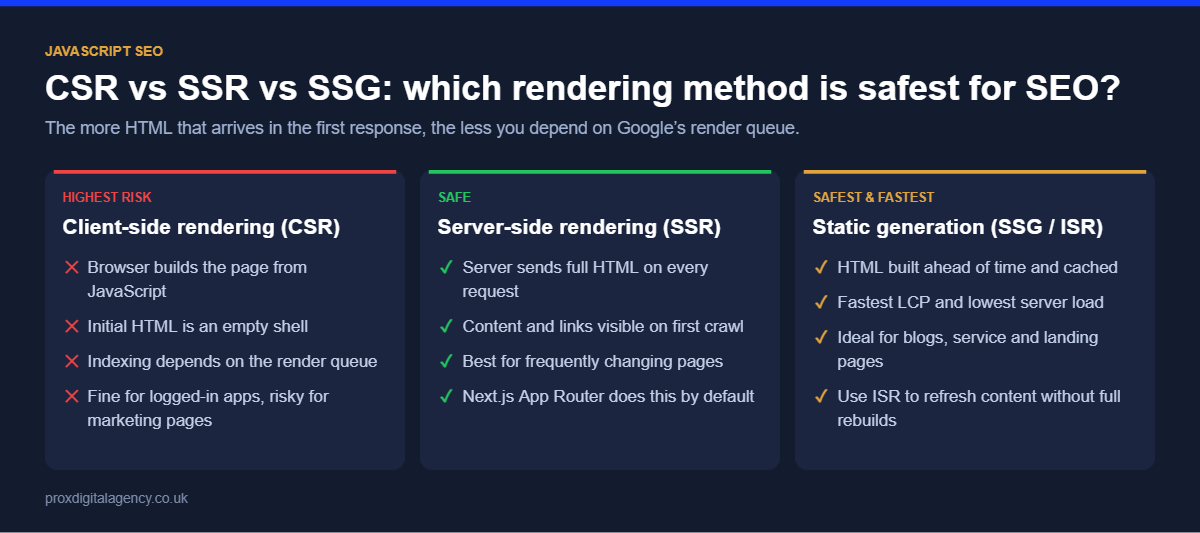
- Client-side rendering (CSR): the browser receives minimal HTML and JavaScript builds the page. CSR is not automatically an SEO failure, but it makes indexing depend on JavaScript running correctly.
- Server-side rendering (SSR): the server generates the full HTML for each request, so important content is in the initial response. For pages that need to rank, this makes critical content directly accessible.
- Static generation (SSG): pages are built as HTML ahead of time, giving search engines and users complete HTML while JavaScript adds interactivity afterwards. Ideal for content that doesn’t change on every request.
The right method depends on the website. Don’t choose SSR just because it sounds SEO-friendly; choose the rendering strategy that reliably exposes the content and signals that matter for each page type.
You may also see dynamic rendering suggested, where bots get a pre-rendered version and users get the JavaScript version. Google now describes dynamic rendering as a workaround rather than a recommended long-term solution; SSR or static generation is the better route.
What Search Engines Need to See
When we review a JavaScript website, we check far more than whether paragraphs appear. These SEO-critical elements must be present and correct in the rendered page:
- Main content: headings, body text, product information or service content.
- Internal links: real
<a href>links, not click handlers on buttons or divs. - Titles and meta descriptions: unique for each indexable page, not one default title across the app.
- Canonical tags: pointing to the correct URL and not changing during rendering.
- Robots directives: no conflict between the initial and rendered HTML. If the initial HTML says noindex, Google may never render the page to see a JavaScript change.
- Structured data: present and accurate in the final output if it is generated dynamically. Our guide to schema markup with JSON-LD examples covers what to include.
The principle is simple: don’t judge SEO by what appears in your browser. Check what the implementation actually delivers.
Common JavaScript SEO Problems
Most problems are not caused by JavaScript existing; they come from how it is implemented.
- Content depends on failed JavaScript. If a script or API call fails and the main content disappears with it, search engines have nothing to index.
- Internal links are not crawlable. Clickable UI elements are not the same as links. Navigation needs real URLs in href attributes.
- Content requires interaction. Text hidden behind clicks, tabs that load content on demand, or infinite scroll without paginated URLs may never be seen.
- Incorrect status codes. Single-page applications often show a “Page not found” message while the server returns 200. Google treats these as soft 404s, which waste crawling and confuse indexing.
- Duplicate URLs. Apps can generate parameters, states or alternative routes that create unnecessary duplicate URLs.
- Inconsistent rendered metadata. Titles, canonicals and robots tags must be checked in the final output, not assumed to work because they exist in the code.
Next.js SEO: What Changes?
Next.js offers server rendering, static generation and incremental static regeneration (ISR), which make it much easier to deliver search-friendly HTML when used deliberately. In the App Router, these features do most of the SEO work:
- Metadata API: export a
metadataobject, or agenerateMetadatafunction for dynamic pages, to output a unique title, description and canonical URL for every route. - next/link: the
<Link>component renders a real<a href>, so navigation stays crawlable while keeping fast client-side transitions. - notFound(): call it when content doesn’t exist so the route returns a genuine 404 status rather than an empty 200 page.
- sitemap and robots files: generate
sitemap.xmlandrobots.txtfrom your data so new pages are listed automatically. - Static generation and ISR: pre-render content pages and revalidate them on a schedule, so Google gets complete HTML without rebuilding the whole site.
Here is a simple example of dynamic metadata for a service page:
export async function generateMetadata({ params }) {
  const service = await getService(params.slug);
  return {
    title: service.seoTitle,
    description: service.metaDescription,
    alternates: { canonical: "https://www.example.co.uk/services/" + params.slug + "/" },
  };
}
Using Next.js does not solve technical SEO automatically. It gives developers the tools for an SEO-friendly build, but they still have to be configured correctly for every important URL.
How to Check Whether Google Can See Your JavaScript Content
When we review a React or Next.js website, we compare three views of each important page rather than trusting a normal browser session.
1. Check the initial HTML
View the page source (not the browser’s Elements panel) to see what the server returns before JavaScript runs. Is the main content already there? Which title, canonical and robots tags are present?
2. Check the rendered page
Then look at the page after JavaScript has run and compare the main content, headings, internal links, canonical tag, meta robots tag and structured data. Large differences between the initial and rendered versions need investigating.
3. Check Google’s own view
In Google Search Console, use URL Inspection, run “Test live URL”, then open “View tested page” to see the rendered HTML, a screenshot and any resources Google couldn’t load. The Rich Results Test also shows Google’s rendered HTML for any public URL. A page working correctly in Chrome on a developer’s laptop does not prove that Google sees the same thing.
Built with React or Next.js and not getting indexed?
We will compare what Googlebot sees with what your users see, and show you which content, links and meta tags are missing from the rendered HTML, free.
Make Internal Links Crawlable
Internal linking deserves special attention on JavaScript applications. A user can click a button and move to another view, but search engines need discoverable URLs and real links. Where navigation represents a genuine page relationship, use a standard anchor with a valid href:
<a href="/services/">Our Services</a>JavaScript can still enhance the experience around those links. What matters is that page discovery never depends solely on custom click handlers. This is particularly important on large sites where categories, products, documentation or resources rely on internal navigation to be found.
Pay Attention to Website Performance
JavaScript is also the main cause of poor Interaction to Next Paint (INP), the Core Web Vital that measures how quickly a page responds to clicks and taps. Large bundles, unnecessary third-party scripts and heavy client-side processing all delay the page before users can interact with it comfortably.
The answer is not to remove JavaScript; modern websites need it. Evaluate what JavaScript is necessary, split large bundles, defer non-critical scripts, and avoid doing work in the browser that the server could do. Our website performance optimisation guide covers this in depth, and our Core Web Vitals guide explains INP and the other metrics.
JavaScript SEO for Large or Headless Websites
JavaScript SEO matters even more when the frontend is separated from the content management system. In a headless setup, content comes from an API while a JavaScript framework controls how it is presented, adding another layer where SEO information has to be passed through correctly. A CMS can hold fields for titles, canonicals and structured data, but that does not guarantee the frontend outputs them. Our headless SEO guide covers this architecture in detail.
A Practical JavaScript SEO Checklist
Before launching or reviewing an important React or Next.js website, check that:
- Important URLs can be discovered and crawled, with real paths rather than # routes.
- Main content is in the server HTML or reliably present after rendering.
- Internal links use real
<a href>destinations. - Titles, descriptions and canonicals are correct and unique for each page.
- Robots directives do not block important pages in either the initial or rendered HTML.
- Missing pages return a real 404 status.
- Structured data appears correctly where required.
- XML sitemaps contain only the intended indexable URLs.
- Redirects happen at server level, not with JavaScript.
- A JavaScript error does not remove essential content.
- Content behind “Load more” or infinite scroll is also available on paginated URLs.
- INP and other Core Web Vitals pass on real devices and connections.
Priorities depend on the website. A small React marketing site and a JavaScript ecommerce platform with hundreds of thousands of URLs are very different technical SEO projects.
When JavaScript SEO Needs a Wider Technical Review
Rendering is often only part of the problem. A JavaScript website may also have issues with crawlability, duplicate URLs, canonicalisation, internal architecture, redirects or performance, and fixing one rendering issue in isolation can leave the main organic search problem unsolved. For more complex builds, experienced technical SEO specialists can assess how rendering interacts with the rest of the site and give your developers a prioritised list of fixes.
Build React and Next.js Websites for Users and Search Engines
JavaScript does not need to be avoided for SEO. React and Next.js both support websites that perform well in organic search, as long as technical SEO is part of the build from the start. Search engines must be able to discover important URLs, access meaningful content, follow internal links and process the signals on each page. For React, focus on how essential content is rendered and how pages are discovered. For Next.js, use the rendering and metadata features deliberately rather than assuming the framework handles SEO for you.
Successful JavaScript SEO comes down to one principle: build the experience you want for users without hiding the content and signals search engines need to understand it.
Prox Digital Agency
Make sure Google sees your JavaScript content
Send us your website address and we will run a free JavaScript SEO rendering check: initial HTML vs rendered HTML, crawlable links, metadata and Core Web Vitals, with fixes your developers can act on.
Frequently Asked Questions
Can Google crawl JavaScript websites?
Yes. Google renders JavaScript using an up-to-date version of Chromium, so it can index content that JavaScript generates. Rendering can be delayed and fails if scripts error, resources are blocked or content needs user interaction, so important content should be reliably available, ideally in the server HTML.
Is React bad for SEO?
No. React is not bad for SEO, but a React app that relies only on client-side rendering makes indexing depend on JavaScript working perfectly. Using server-side rendering or static generation, real URLs and crawlable links makes React sites as SEO-friendly as any other.
Is Next.js good for SEO?
Yes. Next.js is one of the most SEO-friendly JavaScript frameworks because it supports server rendering, static generation, a built-in Metadata API and crawlable links through next/link. It still needs correct configuration of titles, canonicals, status codes and sitemaps for every page.
What is the difference between SSR and CSR for SEO?
With server-side rendering, the server sends complete HTML, so search engines see the content immediately. With client-side rendering, the browser builds the page with JavaScript, so indexing depends on Google rendering it successfully. SSR is generally more reliable for pages that need to rank.
How do I check if Google can see my JavaScript content?
Use URL Inspection in Google Search Console, run “Test live URL” and open “View tested page” to see the rendered HTML and a screenshot. Compare it with your page source. If key content, links or metadata are missing from Google’s version, there is a rendering problem.


 Muhammad Bilal, London
  11 mins
Log File Analysis for SEO: How to Find and Fix Crawl Budget Waste

Hreflang Tags: How to Set Up One Brand Across the UK, US, UAE and Australia

Schema Markup Explained: A Practical Guide for UK Businesses (with JSON-LD Examples)

Technical SEO: The Complete Guide for UK Businesses (2026)

How Much Does Generative Engine Optimisation (GEO) Cost in the UK in 2026?

Google Business Profile Optimisation: The 2026 Checklist

Digital PR for SEO: How to Earn Links Journalists Actually Want

E-E-A-T in 2026: How to Prove Experience, Expertise, Authority and Trust