Faceted Navigation SEO: Stop Filters Wasting Crawl Budget on Your Ecommerce Site
Faceted navigation SEO is the process of controlling which ecommerce filter URLs search engines can crawl and index. When shoppers filter products by size, colour, brand, price or availability, your website can generate a new URL for every selection, such as /shoes/?colour=black, /shoes/?colour=black&size=9 and /shoes/?colour=black&size=9&brand=nike.
On a large ecommerce site those combinations quickly multiply into hundreds of thousands of low-value URLs, and search engines spend time crawling them instead of the category and product pages you want found. The solution is not to remove useful filters. It is to decide which filtered pages have search value and which should exist only to help shoppers browse. This guide explains how to make that decision, the control methods Google recommends, and how to stop faceted navigation wasting crawl budget.
What Is Faceted Navigation?
Faceted navigation is a filtering system that lets users narrow a large product catalogue by attributes such as brand, size, colour, price, material or availability. A shopper might start on /shoes/, select black to reach /shoes/?colour=black, then add size 9 to reach /shoes/?colour=black&size=9.
For shoppers, each filter makes the results more relevant. For search engines, each combination can become another URL to discover and crawl. The SEO problem begins when every possible combination becomes a page search engines can access. For the wider principles behind crawling, indexing and architecture, see our complete guide to technical SEO.
Why Faceted Navigation Can Hurt SEO
The biggest problem with faceted navigation is scale. A store with a few thousand products but filters for colour, size, brand, material, price and availability can generate far more URLs than it has products. Google’s own guidance on faceted navigation describes the result as an “infinite URL space”. It causes three main issues:
- Crawl budget waste: search engines repeatedly crawl filter combinations with little or no search value, and discover new products more slowly as a result.
- Duplicate and near-duplicate pages: different URLs show largely the same products and content.
- Index bloat: low-value filtered pages enter the index and compete with the stronger category pages you would rather rank.
The aim is therefore not to stop all filtered URLs. It is to separate useful search landing pages from combinations that exist purely for browsing.
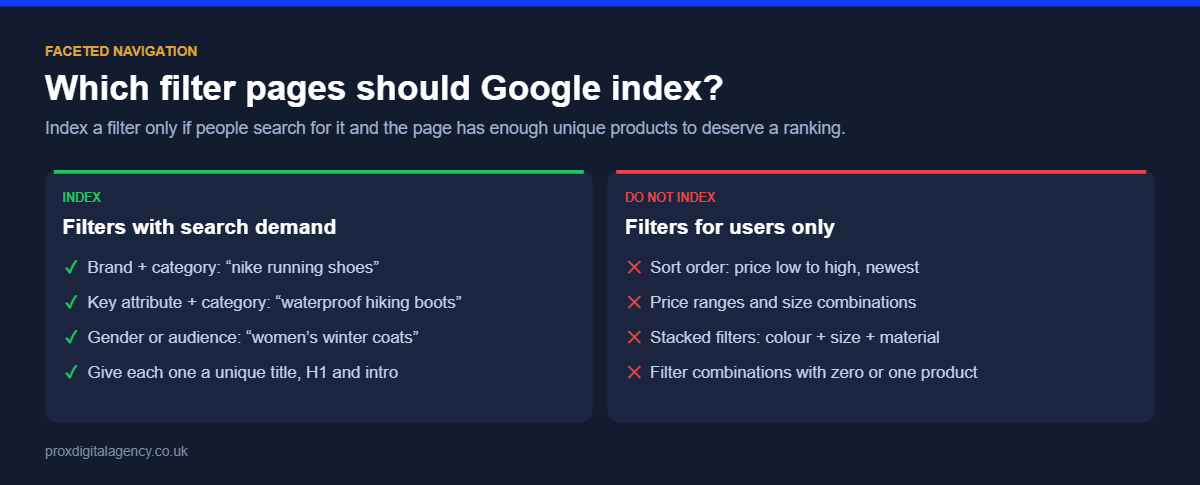
Which Filter Pages Should Be Indexable?
Not every filtered page is low value. If your main category is /mens-shoes/, a page such as /mens-shoes/black/ could deserve search visibility if people actively search for “black men’s shoes” and you stock enough relevant products. Compare that with /mens-shoes/?colour=black&size=9&price=50-75&sort=low-high: useful to one shopper, but it doesn’t need to be an organic landing page.
A practical faceted navigation best practice is to split filters into two groups:
- Search-value pages have genuine search demand, enough inventory and a clear landing-page purpose.
- User-only filters help shoppers refine products but don’t need their own search visibility.
Make this decision deliberately using keyword data. Our keyword research services often start exactly here, measuring demand for every brand, colour and type combination before any URL rules are set.
Turn Valuable Filters Into Proper Landing Pages
When a filter combination has clear search value, treat it as a permanent category rather than a temporary parameter URL. Instead of relying on /shoes/?gender=women&type=running, create /womens-running-shoes/. That page gets its own stable URL, page title and H1, relevant category copy, curated product selection, internal links, self-referencing canonical and indexation signals.
The same approach works for categories such as /black-running-shoes/, /mens-leather-boots/ or /womens-trainers/, provided there is enough search demand and inventory to justify them. It gives search engines a deliberate ecommerce architecture instead of asking them to interpret thousands of temporary filter combinations.
How to Control Low-Value Filter URLs
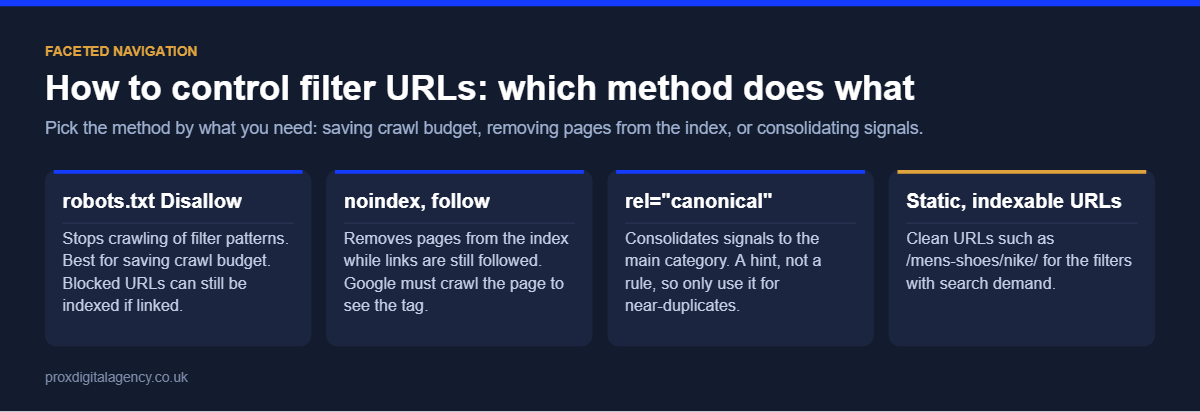
Once valuable combinations are identified, the remaining URLs need a clear strategy. A filtering journey of category → colour → size → brand → price → sort multiplies quickly if every step exposes another crawlable URL. These are the main control methods and when to use each:
A typical robots.txt rule for sort and filter parameters looks like this. Test any rule carefully before deploying it, because a pattern that is too broad can block important pages:
User-agent: *
Disallow: /*?*sort=
Disallow: /*?*view=
Disallow: /*?*price=
Disallow: /*?*size=
Google also recommends three implementation details for filter URLs you do allow to be crawled: use the standard & separator for parameters, keep filters in a consistent order with no duplicates, and return a 404 status when a filter combination has no products, rather than an empty page with a 200 status.
Canonical Tags Alone Do Not Solve the Problem
A common approach is to let filter URLs exist and canonicalise them back to the main category, for example /mens-shoes/?colour=black&size=9 containing <link rel="canonical" href="https://example.com/mens-shoes/" />. This indicates the preferred URL, but it doesn’t make the crawl space disappear. Search engines still discover and request those URLs before they process the canonical, and Google treats the canonical as a hint, not a rule.
If a site generates hundreds of thousands of combinations, adding canonical tags without changing how those URLs are created and linked leaves most of the crawl problem in place. So look beyond the canonical and ask why the URL is being generated and how Google is discovering it.
Use Robots.txt and Noindex Carefully
robots.txt and noindex are both used to manage filtered pages, but they do different jobs. A noindex directive tells search engines not to keep the page in the index once they have crawled it. A robots.txt rule stops crawling altogether, which means search engines can’t see any page-level directive on a blocked URL.
Never combine the two on the same URL expecting both to work: if a page is blocked in robots.txt, Google can’t read its noindex tag, and the URL can still appear in results if other pages link to it. For each group of filter URLs, decide whether search engines should crawl it, whether it should be indexed, whether it contains links search engines need, and which page should rank instead. The technical implementation should follow those decisions.
If you remember Search Console’s old URL Parameters tool, note that Google retired it in 2022. Parameter handling now has to be controlled on the site itself.
Don’t Ignore Sorting, Tracking and Pagination
Visible product filters are only part of the picture. Ecommerce sites also create URLs for sort orders (?sort=price-low), view options (?view=grid), tracking (?utm_source=email) and session parameters. These change the URL without creating meaningful new content, and combined with filters they expand the crawl space even further. A strong technical SEO ecommerce setup reviews the whole parameter system, not just the filters shoppers see.
Pagination is different. Pages such as /shoes/?page=2 help search engines reach products deep in a category, so they should normally stay crawlable, with each page self-canonical rather than canonicalised to page one.
Are your filters creating thousands of crawlable URLs?
We will crawl your category pages, count the filter URLs Google can reach and show you which filters deserve landing pages and which need controlling, free.
Get a free faceted navigation reviewSee our technical SEO services →
Check What Search Engines Are Actually Crawling
A site crawl shows which filter URLs are accessible; server logs show which ones search engine bots actually request. If large amounts of Googlebot activity are concentrated on ?colour=, ?size=, ?sort= and ?price= URLs, you have clear evidence that faceted navigation is creating crawl waste. Our guide to log file analysis for SEO explains how to measure this and turn the data into fixes.
In Google Search Console, large numbers of filter URLs under “Crawled – currently not indexed” or “Discovered – currently not indexed” are another strong warning sign.
A Practical Faceted Navigation Strategy
There is no fixed rule saying which filters should become indexable pages; it depends on your products, inventory and how your market searches. This framework is a sensible starting point:
For one retailer, colour combinations have strong demand; for another, material or brand is more valuable. Keyword demand, product availability and search intent should decide which combinations become permanent landing pages.
Keep Important Categories Easy to Discover
Faceted navigation should support your ecommerce architecture, not become the architecture. If an important category can only be reached by selecting several filters, it probably deserves its own page with direct links from navigation, parent categories and relevant content. A stable URL gives search engines something reliable to crawl and gives the business a page it can optimise independently.
For examples of how successful stores structure product discovery, see our 12 UK ecommerce website design examples, and find out how we help online retailers grow on our ecommerce marketing page.
When Does Faceted Navigation Become a Crawl Budget Problem?
A small store with a limited catalogue and a handful of filters rarely has a meaningful crawl budget problem. The issue grows with the catalogue and the number of possible URL combinations. Warning signs include:
- Search bots repeatedly crawling parameter URLs
- Large numbers of “Discovered – currently not indexed” URLs
- New products and categories being discovered slowly
- Unwanted filtered pages appearing in search results
- Large numbers of duplicate or near-duplicate URLs
- Significant crawling of sort, view or tracking parameters
These signals don’t mean every filter should be blocked. They mean the relationship between filtering, crawling and indexing needs investigating. For complex ecommerce sites, a technical SEO company can assess these systems together instead of applying one crawl rule to every filtered URL.
Give Shoppers Filters Without Giving Search Engines Endless URLs
Good faceted navigation SEO comes down to one idea: filters should make shopping easier, not create an uncontrolled search architecture. Decide which filtered pages deserve organic visibility and which exist only to help shoppers narrow their choices. Turn valuable combinations into stable landing pages, control low-value variations with the right method, review parameters, internal links and canonical signals, and use crawl and log data to check how search engines actually interact with the site. Shoppers keep the filters they need, and search engines get a clean path to the category and product pages that matter.
Prox Digital Agency
Get your filters working for SEO, not against it
Send us your store address and we will run a free faceted navigation review: filter URL counts, index bloat, canonical and robots.txt setup, and the filter pages worth turning into landing pages.
Frequently Asked Questions
What is faceted navigation?
Faceted navigation is the filtering system on ecommerce and listing sites that lets users narrow results by attributes such as brand, size, colour, price or material. Each filter selection usually creates a new URL, which is why it needs careful SEO management on large catalogues.
Should ecommerce filter pages be indexed?
Only the ones with genuine search demand and enough products, such as “women’s running shoes” or a popular brand within a category. Turn those into permanent landing pages. Most other combinations, such as size, price range and sort order, should not be indexed.
Should I use noindex or robots.txt for filter URLs?
Use robots.txt to stop crawling of filter and sort URLs you never want in search, because it saves crawl budget. Use noindex only when a page must stay crawlable but shouldn’t rank. Don’t use both on the same URL: Google can’t read a noindex tag on a blocked page.
Do canonical tags fix faceted navigation problems?
Not on their own. Canonical tags help consolidate near-duplicate filter pages, but Google still has to crawl each URL to see the tag, and treats it as a hint. On large sites, canonicals need to be combined with robots.txt rules, cleaner internal linking and fewer generated URLs.
How do I find filter pages worth turning into landing pages?
Run keyword research on combinations of your categories with brands, colours, materials and types, then check you stock enough products for each. Combinations with consistent monthly searches and at least a dozen relevant products are usually strong candidates for a dedicated landing page.


 Muhammad Bilal, London
  11 mins
Headless SEO: How to Rank a Headless CMS or API-Driven Website

Log File Analysis for SEO: How to Find and Fix Crawl Budget Waste

JavaScript SEO: How to Get React and Next.js Websites Crawled and Indexed

Hreflang Tags: How to Set Up One Brand Across the UK, US, UAE and Australia

Schema Markup Explained: A Practical Guide for UK Businesses (with JSON-LD Examples)

Technical SEO: The Complete Guide for UK Businesses (2026)

How Much Does Generative Engine Optimisation (GEO) Cost in the UK in 2026?
Google Business Profile Optimisation: The 2026 Checklist