Headless SEO: How to Rank a Headless CMS or API-Driven Website
Headless SEO is the process of making sure a website built on a headless CMS or API-driven architecture stays crawlable, indexable and technically optimised for search engines. In a traditional CMS, content management and page presentation live in the same system. A headless setup separates them: the CMS stores content, and a separate frontend retrieves it through an API and displays it.
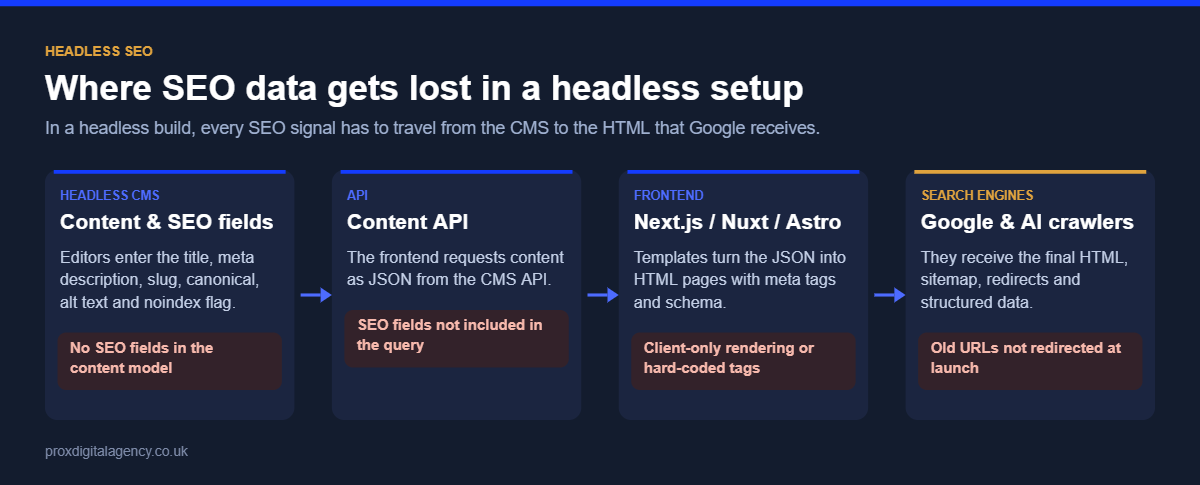
That flexibility is valuable for developers and businesses, but it creates one big SEO risk: having SEO fields in the CMS does not guarantee search engines receive them on the final page. Titles, canonical tags, structured data, internal links and even the main content all have to make the journey from CMS to API to frontend intact. This guide explains how to manage that journey and build a headless website search engines can crawl, render and index, with a launch checklist at the end.
What Is a Headless CMS?
A headless CMS separates content management from the frontend that displays the content. The flow is simple: headless CMS → API → frontend → users and search engines. The CMS manages product descriptions, articles, images and SEO fields; the API delivers that data; and the frontend, often built with React or Next.js, turns it into pages.
In a traditional CMS, templates and rendering are tightly connected to the content, so many SEO features work out of the box. In a headless build, every layer has to preserve the information search engines need. For the broader principles behind crawling and indexing, see our complete guide to technical SEO.
Why Headless Websites Need a Different SEO Approach
The basic requirements of SEO don’t change because a website is headless. Search engines still need crawlable URLs, accessible content, correct titles and metadata, internal links, canonical tags, indexation directives, structured data, XML sitemaps and correct HTTP status codes. What changes is where each element is controlled and how it reaches the final page.
Take a meta title. An editor enters “Technical SEO Guide for UK Businesses” in the CMS, but that field still has to pass through the API and be rendered inside the page’s <title> element. If the connection is missing, the field exists perfectly in the CMS and never appears where search engines read it. That is why headless CMS SEO needs close coordination between content, development and SEO teams.
Make SEO Fields Part of the Content Model
Give editors control over essential SEO information. Depending on the website, each content type may need fields for:
- SEO title and meta description
- URL slug
- Canonical URL (with a sensible default)
- Robots directives (index or noindex)
- Open Graph title, description and image for social sharing
- Image alt text
- Language and region, plus links to equivalent pages, for multi-market sites
- Structured data inputs such as author, price or event date
These fields shouldn’t exist just to have an “SEO tab” in the CMS. Each one must be mapped to the frontend: CMS SEO title → API response → frontend template → <title>. The same applies to descriptions, canonicals and every other page-level signal. An SEO-friendly headless CMS is not simply one that lets you enter SEO data; it is an implementation that guarantees the data reaches the rendered page.
For multi-region sites, store language and regional equivalents in the CMS so the frontend can generate hreflang tags automatically. Our hreflang tags guide explains what those annotations need to contain.
Rendering Is Critical for Headless SEO
Most headless websites use JavaScript frameworks for the frontend, which makes rendering one of the most important decisions. If essential content depends entirely on client-side JavaScript, search engines must render the page before they can process it, and anything that fails during rendering is lost.
- Server-side rendering (SSR): the server generates HTML on each request, so content and metadata are in the initial response.
- Static generation (SSG): pages are built as HTML ahead of time and served instantly.
- Incremental static regeneration (ISR): static pages are rebuilt in the background on a schedule or when content changes.
- Client-side rendering (CSR): JavaScript builds the page in the browser after the initial response, which is the riskiest option for pages that need to rank.
Static and ISR builds have one headless-specific trap: when an editor updates a title or description in the CMS, the change only appears on the live page after it is rebuilt or revalidated. Set up webhooks so publishing in the CMS triggers a rebuild of the affected pages, otherwise Google keeps seeing the old version. Our JavaScript SEO guide for React and Next.js covers rendering in more depth.
Keep URLs Stable and Search-Friendly
Separating the CMS from the frontend can also separate content management from URL management, so clear URL rules matter. Editors and developers should know how slugs are generated, whether editors can change them, what happens when a slug changes, how redirects are created, which URL becomes canonical and how duplicate paths are prevented.
If /services/technical-seo/ is renamed to /services/seo-technical/, the old URL must not simply disappear. The site needs a 301 redirect, updated internal links and a correct canonical on the new page. Build redirect creation into the CMS so a slug change automatically adds the redirect, otherwise routine edits quietly create technical SEO problems.
Build Internal Linking Into the Content Model
Internal links help users and search engines move between related pages. Traditional CMSs give editors tools to pick and link pages; a headless CMS needs the same capability across its API. Where possible, store internal links as references to content entries rather than typed URLs, so links update automatically when a page moves.
The frontend then has to turn those references into crawlable links such as <a href="/services/technical-seo/">Technical SEO</a>. Navigation should never depend solely on JavaScript click events that hide URLs from search engines.
Make Canonical and Robots Controls Reliable
Canonical tags and robots directives cause serious problems when they are handled inconsistently between the CMS and frontend. A page intended for indexing can accidentally output <meta name="robots" content="noindex">, or hundreds of pages can point to the wrong canonical because one shared template is misconfigured. Define clearly:
- The default canonical behaviour (usually self-referencing)
- When editors may override a canonical
- The default robots directive for each content type
- Which content types should be indexable at all
- How staging, preview and draft URLs are kept out of search (password protection or noindex on the whole environment)
These rules matter most at scale, because one frontend template issue can affect thousands of pages overnight.
Generate XML Sitemaps From the Right Content
XML sitemaps should reflect the website’s real indexable URLs. In a headless environment, that usually means pulling eligible entries from the CMS and generating the sitemap in the frontend or at build time. Exclude anything that is noindexed, redirected, deleted, non-canonical, or still in draft or preview. Automation helps, but only with the right rules: adding every CMS entry to the sitemap is not useful if some of them should never appear in search.
Preserve Structured Data Across the API
Structured data is another place where CMS content and frontend code have to work together. A product entry holding the name, price, availability, brand and image gives the frontend everything it needs to generate Product schema; an article entry provides the headline, author and dates for Article schema. Editors shouldn’t have to write JSON-LD by hand. A better implementation lets them manage normal content fields while templates generate the markup consistently.
Always test the final output. A field existing in the API response does not mean the structured data is on the rendered page. Our guide to schema markup with JSON-LD examples shows what each type should contain.
Handle Images Properly
Headless frontends often process images through their own components or an image CDN. Make sure alt text from the CMS is passed through to every image, image file names and URLs are descriptive, modern formats such as WebP or AVIF are served, width and height are set to avoid layout shift, and important images are not lazy-loaded above the fold, which hurts Largest Contentful Paint.
Handle Deleted and Changed Content Properly
Headless architectures make publishing fast, but removing content needs just as much care. When an editor deletes a CMS entry, its public URL should not be left to chance. Depending on the situation, the frontend should return a 301 redirect to an appropriate replacement, a genuine 404, or a 410 where the content is permanently gone.
The site must never return a visually empty page with a 200 status just because the frontend application still loads; Google treats that as a soft 404. Make redirect and removal handling part of the publishing workflow, not an afterthought.
Planning a headless build or migration?
We will review your content model, rendering, URLs, redirects and sitemaps on staging, so SEO problems are fixed before launch rather than after traffic drops.
Book a pre-launch SEO reviewSee our technical SEO services →
Headless WordPress SEO
WordPress can also run as a headless CMS, usually through the REST API or WPGraphQL, with a separate React or Next.js frontend. The same headless WordPress SEO principles apply. Installing Yoast SEO or Rank Math in WordPress does not mean its output appears on the separate frontend: titles, meta descriptions, canonicals, robots directives and schema have to be requested through the API (both plugins expose their data for this) and rendered by the frontend. Sitemaps and redirects created in WordPress also need to be rebuilt or proxied on the frontend domain.
How to Choose the Best Headless CMS for SEO
There is no single best headless CMS for SEO. Instead of trusting a platform’s “SEO-friendly” claim, check whether it supports the workflows your website needs. The popular options compare like this:
Whichever platform you consider, ask: can editors manage titles and descriptions? Can slugs and redirects be controlled? Can canonical and robots settings be managed safely? Can content references support internal linking? Can structured data, sitemaps and hreflang be generated reliably? And can developers access every field through the API?
The frontend matters just as much as the CMS: a strong content platform paired with a poorly built frontend still creates serious SEO problems. For a broader view of the trade-offs, see our comparison of custom website development vs CMS platforms.
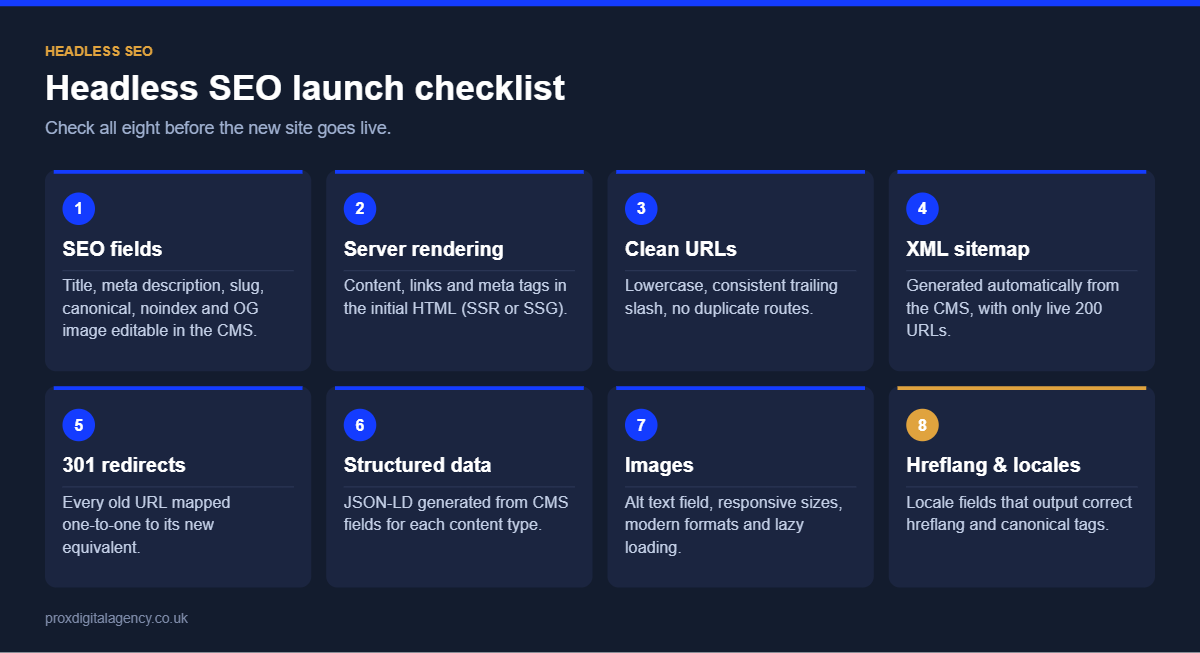
A Practical Headless SEO Checklist
Before launching a headless website, verify that:
- Important pages return meaningful content in the HTML Google receives.
- Titles and meta descriptions render correctly and are unique.
- Canonical tags point to the intended URLs.
- Robots directives match the desired indexation for each content type.
- Internal links are real, crawlable
<a href>links. - XML sitemaps contain only canonical, indexable pages.
- Structured data is valid on the final frontend.
- Slug changes create redirects automatically.
- Deleted content returns a 404, 410 or redirect, never an empty 200 page.
- Preview and staging environments are blocked from search.
- CMS updates trigger rebuilds or revalidation of affected pages.
- Image alt text, sizes and formats come through correctly.
- Hreflang is generated from CMS data on multi-region sites.
- JavaScript rendering does not hide essential content.
The details vary between platforms, but the principle doesn’t: SEO information must survive the complete journey from CMS to API to frontend.
Build SEO Into the Architecture, Not After It
A headless website doesn’t have to trade organic performance for development flexibility. Problems arise when SEO is considered only after the CMS, API and frontend are already built. Define SEO requirements alongside the content model: how the site will handle URLs, metadata, rendering, internal links, canonicals, structured data, sitemaps, redirects and indexation.
At Prox, we review headless builds before launch: mapping every SEO field from CMS to rendered page, testing rendering and status codes, and checking sitemaps, redirects and schema on a staging environment, so problems are fixed before Google ever sees them. If you are planning or running a headless site, our technical SEO agency can work alongside your developers to build these requirements in from the start, or you can book a free strategy call.
A headless CMS gives you freedom over how content is managed and delivered. Headless SEO makes sure that freedom doesn’t break the signals search engines rely on.
Prox Digital Agency
Launching a headless website?
Send us your staging or live URL and we will check every SEO signal from CMS to rendered HTML, free: SEO fields, rendering, canonicals, sitemaps, redirects and structured data.
Frequently Asked Questions
Is a headless CMS good for SEO?
A headless CMS can be excellent for SEO, with fast pages, flexible content models and clean code, but nothing works automatically. Titles, canonicals, sitemaps, redirects and structured data must be built into the frontend. Done properly, headless sites rank as well as or better than traditional CMS sites.
What is the best headless CMS for SEO?
There is no single best option. Contentful, Sanity, Strapi, Storyblok and headless WordPress can all support strong SEO. Choose the one whose content modelling, redirect handling, localisation and API access fit your team, then make sure your frontend outputs every SEO field correctly.
Does headless WordPress hurt SEO?
Not if it is implemented properly. The risk is assuming Yoast or Rank Math still works: their titles, meta descriptions, canonicals and schema must be pulled through the API and rendered by the frontend, and sitemaps and redirects must work on the frontend domain.
How do I add meta tags to a headless CMS website?
Create SEO fields such as title, description, canonical and robots in your content model, expose them through the API, and render them in the frontend’s page head, for example with the Next.js Metadata API. Then check the live page source to confirm each tag appears correctly.
Do I need server-side rendering for a headless website?
Not necessarily, but pages that need to rank should deliver complete HTML, which server-side rendering, static generation or incremental static regeneration all provide. Relying only on client-side rendering makes indexing depend on Google rendering your JavaScript successfully, which is the riskiest option.


 Muhammad Bilal, London
  9 mins
Faceted Navigation SEO: Stop Filters Wasting Crawl Budget on Your Ecommerce Site

Log File Analysis for SEO: How to Find and Fix Crawl Budget Waste
JavaScript SEO: How to Get React and Next.js Websites Crawled and Indexed

Hreflang Tags: How to Set Up One Brand Across the UK, US, UAE and Australia

Schema Markup Explained: A Practical Guide for UK Businesses (with JSON-LD Examples)

Technical SEO: The Complete Guide for UK Businesses (2026)

How Much Does Generative Engine Optimisation (GEO) Cost in the UK in 2026?
Google Business Profile Optimisation: The 2026 Checklist