Log File Analysis for SEO: How to Find and Fix Crawl Budget Waste
Google Search Console tells you which pages Google has indexed and highlights many crawling issues, but it doesn’t show exactly how search engine bots move through your website. Your server logs do. Every time a bot requests a URL, the server records the visit, and log file analysis turns that raw data into SEO insight: which pages Googlebot crawls, how often, where it spends its time, and which important URLs it overlooks.
For large websites, this reveals something particularly valuable: crawl budget waste. This guide explains how SEO log file analysis works, where to get your logs, which tools to use, what to look for, and how to fix the causes without blocking pages that matter.
What Is Log File Analysis?
Log file analysis is the process of reviewing server request logs to understand how users and automated bots interact with a website. For SEO, the focus is on requests from search engine crawlers such as Googlebot. A typical log entry records:
- The requested URL
- Date and time
- User agent (which bot or browser made the request)
- IP address
- HTTP status code
- Request method (GET, HEAD, POST)
- Response size in bytes and, on many servers, response time
- Referrer
The value is in the difference between possible and actual. An SEO crawler might tell you a website has 100,000 crawlable URLs; log data shows which of those Googlebot actually visits and where its requests are concentrated. For the principles behind crawling and indexation, see our complete guide to technical SEO.
What Is Crawl Budget?
Crawl budget is the number of URLs a search engine can and wants to crawl on your site in a given period. Google describes it as the combination of crawl capacity (how much crawling your server can handle without slowing down) and crawl demand (how much Google wants to crawl, based on the site’s size, popularity, update frequency and quality).
It is not a fixed number every site needs to maximise. Google’s own crawl budget guidance says it mainly matters for large sites with more than about a million unique pages that change weekly, medium or larger sites with more than 10,000 pages that change daily, and sites where a large share of URLs sit in “Discovered – currently not indexed”. For a 50-page business website, crawl budget is rarely a concern.
It becomes relevant on large ecommerce stores, marketplaces, publishers, job and property platforms, directories and any site whose filters or parameters generate huge numbers of URL variations. The objective of crawl budget optimisation is not simply to make Googlebot crawl fewer pages. It is to reduce wasted crawling so important content is discovered and revisited faster.
Start With the Crawl Stats Report
Before downloading any logs, open Google Search Console and go to Settings → Crawl stats. This free report shows total crawl requests, average response time, and a breakdown by response code, file type, purpose (discovery or refresh) and Googlebot type over the last 90 days. If response times are rising, server errors are appearing, or most requests go to redirects and non-HTML files, you have a reason to dig into the logs.
Crawl Stats gives you summaries, not individual URLs. For URL-level evidence, you need the logs themselves.
Where to Get Your Server Log Files
Log files are stored by your web server or the services in front of it. Depending on your setup, you can download them from:
- Your hosting control panel (for example cPanel’s “Raw Access” logs) on shared or managed hosting.
- The server itself: Apache and Nginx write access logs that your developer or hosting provider can export.
- Your CDN: if you use Cloudflare, Fastly or Akamai, many requests never reach your server, so the CDN’s logs are the complete record.
- Cloud platforms such as AWS, Google Cloud or Azure, through their logging services.
Collect at least 30 days of data, and ideally 60 to 90 days on large sites, so you see patterns rather than one-off spikes. Logs contain IP addresses, which are personal data under UK GDPR, so store them securely and filter out visitor data you don’t need.
How Log File Analysis Reveals Crawl Waste
Imagine an ecommerce website with 30,000 useful category and product URLs whose filters generate another 200,000 URL combinations. A site crawl shows that those URLs exist. Server logs answer the more important question: is Googlebot actually spending requests on them?
If the logs repeatedly show requests such as these, while important product pages are crawled rarely, you have strong evidence that the URL structure is creating unnecessary crawler activity:
/shoes/?colour=black
/shoes/?colour=black&size=9
/shoes/?colour=black&size=9&sort=price
/shoes/?sort=price&view=grid
That gives you a much better starting point than assuming every technically accessible URL causes the same problem.
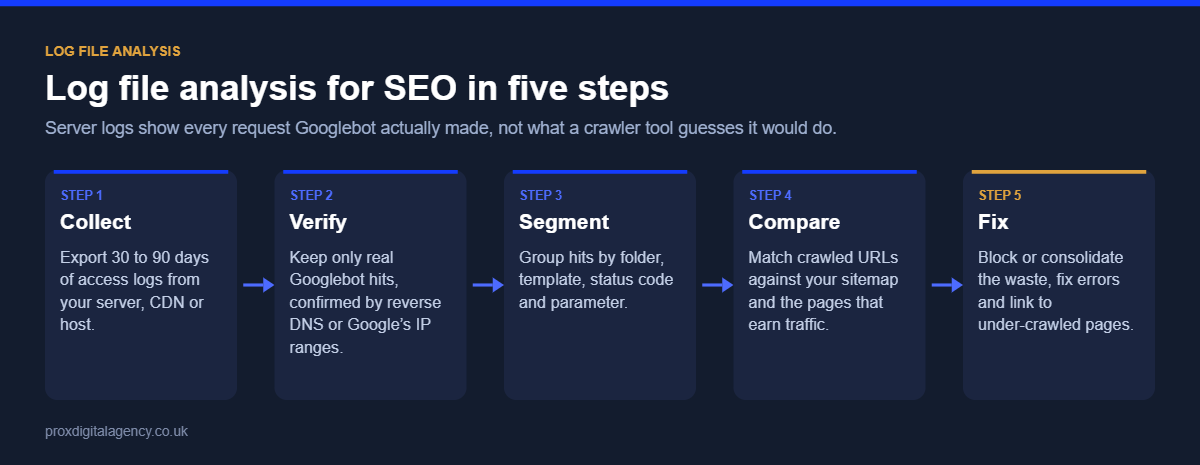
Step 1: Identify and Verify Search Engine Bot Activity
Raw logs contain requests from real visitors, monitoring tools, SEO crawlers, scrapers and many other bots. The first step is isolating the search engine requests that matter. Filtering by user agent is not enough on its own, because many bots fake the Googlebot user agent. Verify genuine Googlebot traffic with a reverse DNS lookup (the IP should resolve to googlebot.com or google.com, and that hostname should resolve back to the same IP), or by matching IPs against the ranges Google publishes. Google explains both methods in its guide to verifying requests from Google; most log analysis tools do this for you.
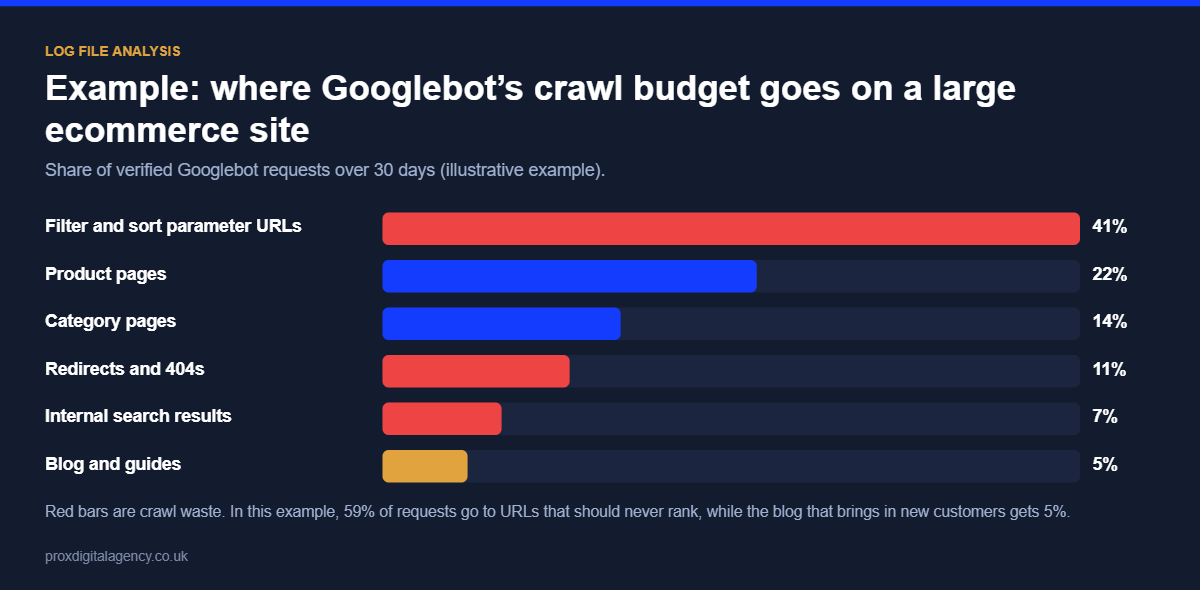
Once you have verified requests, group them by URL, directory, page type, status code, crawl frequency and date. That turns millions of lines into patterns, for example:
The interesting question isn’t which directory gets the most requests. It’s whether crawling reflects the website’s actual SEO priorities.
Step 2: Find Where Crawl Budget Is Being Wasted
With bot activity organised, look for URLs that are crawled repeatedly without offering enough search value.
- Parameter and filter URLs: filters, sorting options and tracking parameters create many versions of essentially the same page, especially on ecommerce sites. Our faceted navigation SEO guide covers how filters create large crawl spaces and how to control them.
- Redirecting URLs: repeated requests to URLs that redirect suggest old URLs are still linked internally or listed in sitemaps.
- 404 and other error URLs: some 404 crawling is normal after site changes, but persistent patterns point to broken internal links or outdated external links.
- Duplicate or low-value URLs: print versions, session parameters, internal search results and other generated pages that add no search value.
Step 3: Check Whether Important Pages Are Being Crawled
Log file analysis is not only about excessive crawling; it also reveals under-crawling. Suppose a new collection of 500 important pages launched last month, but the logs show Googlebot has visited only a fraction of them. Ask whether they are linked internally, included in the XML sitemap, buried too deep in the architecture, competing with bots spending time elsewhere, or blocked by a technical issue.
This is why SEO crawl budget work is not about reducing the number of URLs. The real objective is to make important URLs easy to reach while controlling unnecessary crawl paths.
Step 4: Analyse HTTP Status Codes
Status codes add another layer of insight:
Lots of 200 responses are not automatically good: those URLs still need to be worth crawling. Some redirects and 404s are perfectly normal. Look for patterns. If thousands of bot requests hit unnecessary redirects, broken URLs or server errors, find and fix the source rather than looking at each request individually. Rising 5xx errors or slow response times are especially important, because Google reduces crawling when a server struggles.
Step 5: Compare Logs With Google Search Console
Server logs and Search Console answer different questions, which is why they work so well together. Search Console reports indexing, search performance and crawl summaries; logs show exactly what reached the server. If the Page Indexing report shows a group of pages as “Discovered – currently not indexed”, the logs tell you whether Googlebot has visited those URLs at all and how often.
If you are already seeing crawl or indexing warnings, our guide to common Google Search Console errors helps you interpret them alongside what the logs reveal.
Want to know where Googlebot is wasting its time on your site?
Share a sample of your server logs and we will show you which URL patterns use the most crawl activity and which important pages Google is missing, free.
Get a free crawl waste reviewSee our technical SEO services →
How to Reduce Crawl Budget Waste
Once you know where unnecessary crawling happens, fix the cause. The right solution depends on the URL type.
- Update internal links so they point directly to final URLs, not redirects or 404s.
- Clean up XML sitemaps so they list only canonical, indexable URLs, with accurate lastmod dates.
- Block truly useless URL patterns in robots.txt. This is the method Google recommends for saving crawl budget on URLs you never want crawled, such as sort orders and internal search results. A noindex tag does not save crawl budget, because Google still has to crawl the page to see it.
- Control faceted navigation by deciding which filter combinations deserve landing pages and stopping the rest being generated or crawled.
- Fix broken URLs and redirect chains at the source, and return 404 or 410 for pages that are permanently gone.
- Reduce URL variations from tracking, session and sorting parameters in internal links.
- Improve server response times, because a faster, stable server lets Google crawl more.
The goal is to reduce crawl waste without accidentally hiding useful pages. Never block a page in robots.txt that you need removed from the index; Google can’t see the noindex tag on a page it isn’t allowed to crawl.
Log File Analysis Tools
A log file analysis tool becomes essential once the dataset is too large to review by hand. The main options are:
- Screaming Frog Log File Analyser: desktop tool with Googlebot verification, crawl frequency and status code reports. A good starting point for most sites.
- Semrush Log File Analyzer: browser-based analysis within the Semrush platform.
- Botify, JetOctopus or Oncrawl: enterprise platforms that combine logs with crawl data for very large sites.
- BigQuery, Excel or Python: custom analysis when you need full control or very large datasets.
Whichever you use, it should answer: which URLs does Googlebot crawl most often, which important pages it rarely visits, how much crawling goes to parameters and filters, which status codes it meets, and how activity changes over time. The tool is only part of the process. Knowing that filter URLs received 40% of bot requests is useful; working out why, and whether it needs to change, takes technical analysis of the website itself.
When Crawl Budget Optimisation Actually Matters
Not every website needs a crawl budget project. For a small site with a clean structure and a limited number of indexable pages, crawl efficiency is unlikely to be the first technical SEO priority. Log analysis becomes more useful as complexity grows: a site with hundreds of thousands of URLs, dynamic filters and frequently changing inventory has a completely different crawling environment from a 30-page corporate website.
So before trying to reduce crawl budget, confirm crawl waste is actually affecting the site. For complex websites, technical SEO experts can combine log data with site architecture, indexation and crawl analysis to identify where changes are genuinely needed. If you want a broader health check first, our technical SEO audit guide walks through the process.
Turn Server Data Into SEO Decisions
Log files look like rows of technical data, but for SEO they answer a valuable question: what are search engine bots actually doing on your website? They show whether Googlebot keeps visiting parameter URLs, filters, redirects and errors, and whether valuable pages get the crawl attention they need.
The process is straightforward: identify and verify bot activity, find crawl patterns, compare important and low-value URLs, investigate the cause, fix the underlying issue and monitor the change. Instead of guessing which URLs waste crawl activity, you work from what search engine bots are really requesting.
Prox Digital Agency
Turn your server logs into a crawl budget plan
Send us 30 days of access logs and we will run a free crawl waste review: verified Googlebot activity, wasted URL patterns, status code problems and under-crawled pages, with a fix list in priority order.
Frequently Asked Questions
What is log file analysis in SEO?
Log file analysis in SEO means reviewing your server’s access logs to see exactly which URLs search engine bots requested, how often, and what response they received. It shows where Googlebot spends its time, which important pages it misses, and where crawl budget is wasted.
How do I get my website’s server log files?
Download them from your hosting control panel, ask your developer or hosting provider to export Apache or Nginx access logs, or export them from your CDN, such as Cloudflare, if you use one. Collect at least 30 days of data and store it securely, as logs contain IP addresses.
What is crawl budget?
Crawl budget is the number of URLs a search engine can and wants to crawl on your website within a period. It depends on how much crawling your server can handle and how much Google wants to crawl, based on your site’s size, popularity, freshness and quality.
Does crawl budget matter for small websites?
Usually not. Google says crawl budget mainly matters for sites with around a million or more pages, or more than 10,000 pages that change daily. If your new pages are crawled within a day or two of publishing, keeping your sitemap up to date is enough.
How do I know if a bot is really Googlebot?
Run a reverse DNS lookup on the IP address: genuine Googlebot resolves to a googlebot.com or google.com hostname, and a forward lookup of that hostname returns the same IP. You can also check the IP against Google’s published ranges. Log analysis tools usually verify this automatically.
Which tools can analyse log files?
Popular options are Screaming Frog Log File Analyser for most sites, Semrush Log File Analyzer, and enterprise platforms such as Botify, JetOctopus and Oncrawl for very large sites. For custom analysis of big datasets, many teams use BigQuery, Excel or Python.


 Muhammad Bilal, London
  11 mins
JavaScript SEO: How to Get React and Next.js Websites Crawled and Indexed

Hreflang Tags: How to Set Up One Brand Across the UK, US, UAE and Australia

Schema Markup Explained: A Practical Guide for UK Businesses (with JSON-LD Examples)

Technical SEO: The Complete Guide for UK Businesses (2026)

How Much Does Generative Engine Optimisation (GEO) Cost in the UK in 2026?

Google Business Profile Optimisation: The 2026 Checklist

Digital PR for SEO: How to Earn Links Journalists Actually Want

E-E-A-T in 2026: How to Prove Experience, Expertise, Authority and Trust