Local SEO for Multiple Locations: How to Rank Every Branch Without Duplicate Content
Local SEO for multiple locations helps businesses improve their visibility in local search results across different branches, cities, and service areas. Each location needs accurate business information, a relevant Google Business Profile, and website content that reflects what customers can find there.
But how do you optimise several locations without publishing almost identical pages?
The key is to maintain consistent brand information while providing useful, location-specific details. A business operating in London, Manchester and Birmingham should make each branch easy to find without simply changing the city name across its website.
This guide explains how to manage multi-location SEO, optimise individual branches, avoid duplicate content and maintain accurate local business information as your company expands.
What Is Multi-Location SEO? (Local SEO for Multiple Locations Explained)
Multi-location SEO is the process of improving local search visibility for a business operating from more than one physical location or serving multiple geographic areas.
Rather than optimising a single business listing and website page, you need to manage the online presence of each relevant location.
For example, a dental group with practices in Leeds, Sheffield and Nottingham may need separate Google Business Profiles and dedicated website pages for each practice.
For instance, each branch may have different opening hours, contact details, team members and available services.
Multi-location SEO helps organise this information so customers can find the branch most relevant to them.
How Is Local SEO for Multiple Locations Different?
The main difference is the number of business locations, listings and webpages that need to be managed.
The basic local SEO principles remain the same. However, businesses with several locations need a more structured approach to maintain accuracy and avoid unnecessary content duplication.
For an explanation of the underlying ranking factors, read our complete guide to local SEO.
Why Does Local SEO Matter for Businesses with Multiple Locations?
Multi-location SEO helps businesses improve visibility across different areas while making it easier for customers to find the right branch. Each location needs accurate details, including its address, opening hours, and available services.
Improve Local SEO Visibility Across Multiple Locations
Each branch can target relevant local searches in its area. However, visibility depends on factors such as relevance, distance, and prominence, so rankings may vary between locations.
Help Customers Find the Correct Branch
Accurate addresses, contact details, and opening hours help customers identify the most suitable branch, particularly when services and availability differ between locations.
Maintain Brand Consistency
Consistent branding and business information help customers recognise your company, while location-specific details ensure each branch provides relevant and useful information.
How to Structure Your Website for Local SEO Across Multiple Locations
A clear website structure helps visitors move between your main business information and individual branches.
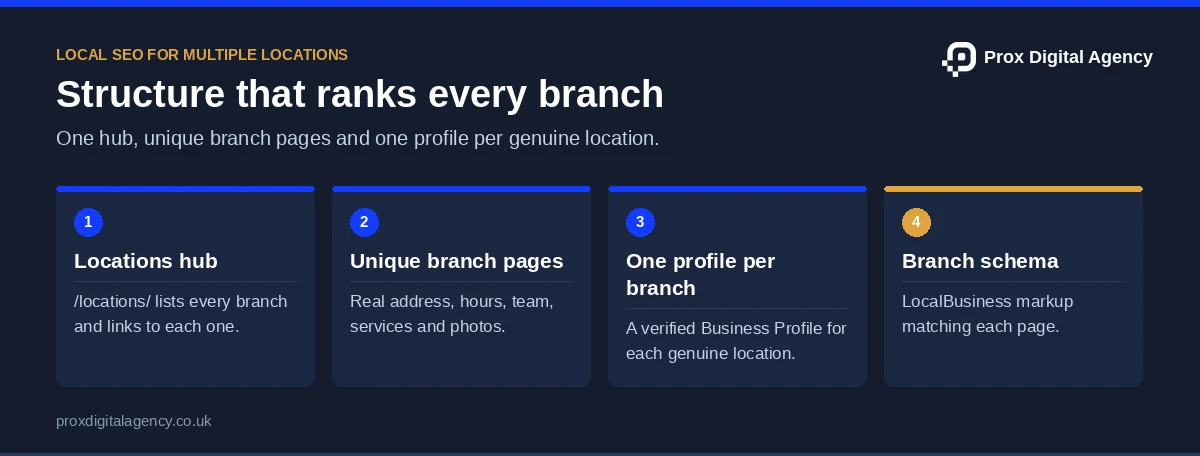
For most multi-location businesses, a central location directory supported by individual branch pages is a practical starting point.
Create a Central Locations Page for Local SEO
First, a central locations page should help customers find the right branch.
For example, it may include a searchable location directory, links to individual branches, relevant contact information and a map where useful.
For example, a business with branches in London, Manchester and Birmingham could organise its website like this:
- /locations/
- /locations/london/
- /locations/manchester/
- /locations/birmingham/
However, this structure is an example, not a mandatory Google requirement.
Above all, the most important consideration is that the URLs are logical, accessible, and supported by clear internal links.
Give Every Genuine Branch Its Own Page
Next, each branch page should answer the questions customers have about that location.
Useful information includes:
- Branch name and accurate address
- Local telephone number, where available
- Opening hours
- Services available at that branch
- Directions or transport information
- Relevant facilities and accessibility information
- Photographs of the actual premises
- Local enquiry or booking options
For example, a fitness company may offer swimming facilities at its Manchester branch but only gym and fitness classes at its Leeds location.
As a result, explaining those differences makes each page more useful.
Use Relevant Page Titles and Headings
Each location page should have a descriptive title that reflects the branch.
For example:
Title: Fitness Centre in Manchester | Example Fitness
H1: Example Fitness – Manchester
At the same time, avoid adding unnecessary location keywords throughout the page.
Instead, the business name, branch location, and genuine services should provide the main context.
In short, a clear page structure is more valuable than repeatedly mentioning the same city.
Add LocalBusiness Schema to Each Branch Page
Each branch page can carry its own LocalBusiness structured data with that branch’s name, address, phone number and opening hours, matching what visitors see on the page. Google’s local business structured data guide lists the supported properties, and our schema markup guide shows how to add it on WordPress.
How to Avoid Duplicate Content When Doing Local SEO for Multiple Locations
Duplicate content occurs when multiple location pages contain nearly identical information, with only the city name changed. Google may choose one representative URL for similar pages, limiting their individual visibility. While duplication isn’t automatically a policy violation, each page should provide genuine value to local customers.
Include Meaningful Location-Specific Details
Make each page useful by including relevant branch information:
- Services: Highlight services specific to the location.
- Local teams: Introduce relevant staff members.
- Facilities: Mention parking, accessibility, or other amenities.
- Opening hours: Provide accurate branch schedules.
- Local examples: Include genuine projects or activities.
Meanwhile, shared business information can remain consistent across pages.
Avoid City-Name Swapping
In other words, simply replacing city names doesn’t make content unique.
Weak: “We provide reliable cleaning services in Manchester.”
Better: “Our Manchester team provides office cleaning from our Salford branch, including regular maintenance and deep cleaning.”
Clearly, the second example provides more specific information, provided it accurately reflects the business.
Don’t Create Pages for Locations You Don’t Genuinely Serve
Only create location pages for areas your business actually serves. Include accurate service coverage and useful local details rather than generating pages solely to target geographic keywords.
For a step-by-step build, read our guide to creating local landing pages that convert.
Running several branches?
Send us your locations. We will check every branch profile and location page for gaps, duplicates and wrong details, free.
Local SEO for Multiple Locations: Optimising Each Google Business Profile
Each eligible branch should have its own Google Business Profile with accurate location-specific information. This helps customers find the correct branch through Google Search and Maps. Avoid creating profiles for locations where your business doesn’t genuinely operate: Google’s guidelines for representing your business require every listing to reflect a genuine location.
Set Up a Profile for Each Eligible Branch
Check for existing listings before creating new ones to avoid duplicates. Ensure each profile includes the correct business name, address, category, opening hours and contact details.
Keep Business Names Consistent
Use your recognised trading name across all branch profiles. Avoid adding unnecessary location keywords or promotional phrases that don’t reflect your actual business name.
Add Relevant Branch Photographs
Upload genuine photographs of each branch, including its shopfront, facilities or reception area, to help customers recognise the location.
Keep Opening Hours Accurate
Also, maintain correct opening hours for each branch, including weekends and special hours. Assign responsibility for keeping this information updated.
Local SEO for Multiple Locations: Managing NAP Consistency
NAP refers to a business’s name, address, and phone number.
For a multi-location company, maintaining accurate NAP information requires keeping a separate record for every branch.
For example:
Above all, each location should have information that accurately reflects how customers can contact or visit it.
Create a Central Location Database
Maintain a master spreadsheet or central database containing each branch’s approved information.
In addition, include its unique location identifier, address, phone number, opening hours, website page, and profile status.
Consequently, it becomes easier to manage changes without relying on individual teams to maintain separate records.
Audit Existing Directory Listings
Then check important business directories and mapping platforms for outdated or duplicate branch information.
For example, an older listing might continue showing an address after a branch has moved.
Most importantly, prioritise corrections that could lead customers to the wrong location or contact number.
A complete process is covered in our local citations and NAP consistency guide.
How to Manage Local SEO Across 500+ Locations
Managing hundreds of locations requires centralised data, clear responsibilities and consistent processes to keep business information accurate across all branches.
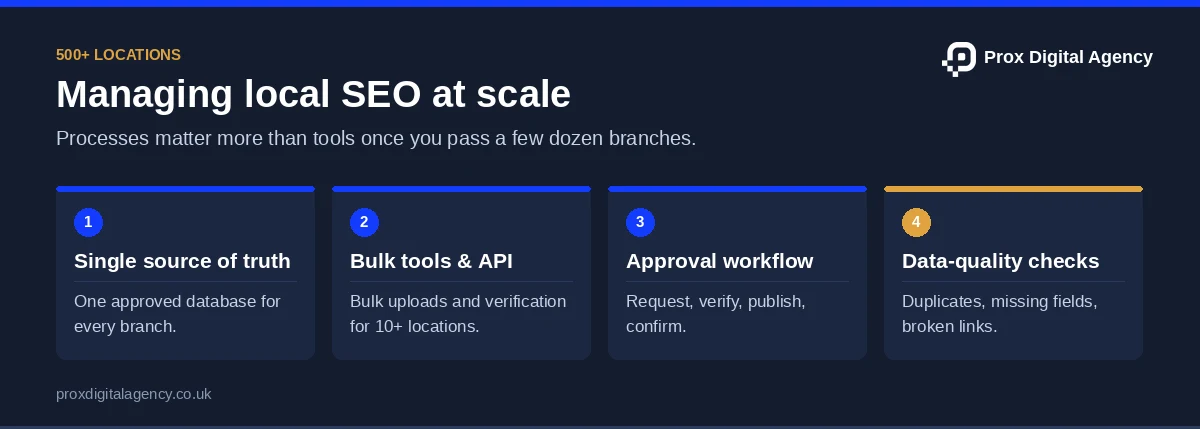
Use a Single Source of Truth
Maintain a central database with each branch’s address, contact details, opening hours, categories, and website URL. Assign responsibility for verifying and approving updates.
Use Bulk Tools to Manage Local SEO for Multiple Locations
Google Business Profile Manager supports bulk updates, spreadsheet uploads, and eligible bulk verification for businesses with ten or more locations. API integrations can also simplify large-scale management.
Establish an Approval Process
Create a standard process for location updates: request the change, verify the information, update the central database, publish the changes, and confirm their accuracy.
Monitor Data Quality
Regularly check for outdated information, duplicate profiles, missing details, and broken links. Use automated reports where possible to identify issues across multiple branches.
Local SEO for Multiple Locations Without Physical Branches
Not every business serving multiple cities operates a physical office in each location.
Tradespeople, maintenance companies and other mobile service providers may cover several areas from one legitimate base.
Therefore, these businesses should distinguish between their actual premises and the places where they provide services.
Represent Your Business Accurately
Specifically, Google Business Profile eligibility depends on the business’s operating model.
A company shouldn’t create a profile at a virtual office or an address where it doesn’t genuinely operate simply to target another city.
Instead, eligible service-area businesses can specify service areas according to Google’s rules.
Use Website Content to Explain Service Coverage
Your website can explain the areas you serve, even when you don’t have physical branches in each area.
However, location pages should provide meaningful information rather than repeat the same generic content.
Where appropriate, explain service availability, travel considerations, coverage boundaries, and relevant local experience.
In other words, a service-area page isn’t equivalent to a physical branch page.
Therefore, keeping that distinction clear helps avoid misleading customers.
How to Track Local SEO Performance for Multiple Locations
Multi-location SEO should be measured at both branch and business levels.
Company-wide reporting provides an overall view, but it can hide differences between locations.
For example, strong performance in London might conceal declining enquiries in Birmingham.
Monitor Individual Business Profiles
Review location-level performance information where available.
Useful metrics may include calls, website clicks, direction requests and other supported interactions.
Keep in mind that clicks and requests are not the same as completed enquiries or visits.
Track Location Page Performance
Use Google Search Console to monitor relevant pages, search queries, impressions, and clicks.
Then compare how individual location pages perform over time.
Website analytics and enquiry tracking may also help identify whether visitors contact the correct branch.
Evaluate Local Rankings by Area
Local results vary depending on the searcher’s location.
A business may perform well near its branch but appear less prominently farther away.
When monitoring rankings, use relevant geographic areas and consistent measurement methods.
For this reason, avoid using one search from one position as the definitive ranking for an entire city.
Review Business Outcomes
The most useful measures depend on what the business wants to achieve.
For a dental group, appointment enquiries may matter more than website visits alone.
For a retail chain, store visits, direction requests and relevant product enquiries may be important.
Finally, use these outcomes alongside visibility metrics to understand whether your local SEO work supports business objectives.
Common Mistakes in Local SEO for Multiple Locations
Businesses with several branches often encounter problems that a single-location company may not face.
Publishing Near-Identical Location Pages: Changing only the city name offers little additional value to customers.
Creating Ineligible Business Profiles: Virtual offices and addresses without genuine operations may violate Google’s policies.
Using Incorrect Branch Details: Outdated telephone numbers, addresses, and opening hours can lead customers to the wrong location.
Overlooking Internal Links: Customers should be able to move easily between the main locations directory and individual branch pages.
Applying One Strategy Without Reviewing Local Differences: Competitive conditions and service availability can vary between cities.
Measuring Only Company-Wide Performance: Aggregate data may hide branch-specific problems.
Addressing these issues can improve the accuracy and usefulness of your multi-location presence.
When to Get Professional Help With Local SEO for Multiple Locations
Managing local SEO for multiple locations becomes more complex as the number of branches increases.
Businesses may need additional support when they struggle with inconsistent listings, duplicate content, technical website issues, or maintaining accurate location data.
An experienced team can help coordinate website structure, local keyword targeting, business profile management, and performance reporting across branches.
At Prox Digital Agency, we support businesses developing a coordinated approach to local search visibility.
Explore our local SEO agency in London services to understand how professional support can fit your wider marketing strategy.
Frequently Asked Questions About Local SEO for Multiple Locations
Does Every Business Location Need Its Own Google Business Profile?
Each separately eligible physical branch should generally have its own profile.
However, eligibility depends on the business’s operating model and Google’s guidelines.
Equally, you shouldn’t create additional profiles merely to target nearby cities.
Can I Use the Same Content on Multiple Location Pages?
Some shared content is reasonable, especially when branches offer the same services.
However, each location page should provide meaningful information relevant to that branch.
Pages that differ only by city name may offer limited value and can create duplicate-content or doorway-page concerns.
Can One Website Rank in Multiple Cities?
Yes. A business website can appear in organic results for searches associated with multiple locations.
Its visibility depends on relevant content, competition, search intent, and other ranking systems.
Even so, that doesn’t guarantee a Google Maps position in every city.
How Many Location Pages Should a Business Create?
There isn’t a fixed ideal number.
Create pages for genuine branches or clearly defined service areas when those pages provide meaningful information to customers.
In any case, avoid creating location pages solely to capture additional keywords.
Can Businesses Manage Hundreds of Google Business Profiles?
Yes. Google offers bulk management options for eligible businesses, including spreadsheet-based location management.
Bulk verification may be available to qualifying businesses with ten or more locations under the same business.
The process and eligibility requirements should be reviewed before implementation.
How Do I Avoid Duplicate Content Across Branch Pages?
Include accurate branch-specific information, such as services, facilities, opening hours, staff details, and genuine local information.
Keep shared company details consistent, but make sure each page serves a distinct purpose.
Conclusion: Local SEO for Multiple Locations Makes Every Branch Easy to Find
As a business expands, customers should still be able to find accurate information about the branch that serves them.
Effective multi-location SEO depends on maintaining that clarity across your website, business listings, and customer contact points.
A consistent brand presence matters, but individual locations also need to reflect their actual services, facilities, and operating details.
The goal is not to make every branch appear identical online. It’s to give each location a clear, accurate presence that helps nearby customers find the right business.
Prox Digital Agency · Local SEO
Need every branch to rank, not just head office?
We manage branch profiles, location pages and reporting across all your sites, so each location wins its own local searches.


 Muhammad Bilal, London
 15 mins
The Complete Guide to Hiring a Web Development Agency in the UK (2027)
Local Citations and NAP Consistency: How to Build, Audit and Clean Up Your Business Listings
Local SEO for Small Businesses: A Step-by-Step Plan for Your First 90 Days
What Is Local SEO? A Complete Guide to Ranking in Google Maps and Local Search (2026)

Prox Digital Agency Releases Free 2027 Website Checklist as Fewer Than Half of Mobile Sites Pass Google’s Speed Test

B2B SEO Case Study: How We Took Aegotel from Hacked and Invisible to Full Tracking

Prox Digital Agency Named Second in NeuralAdX Ltd’s “Best Google Gemini Optimisation Agency UK” Comparison

International SEO Keyword Research: How We Research New Markets (UK, US, UAE and Australia)