Keyword Mapping: How to Assign Keywords to Pages and Avoid Cannibalisation
Keyword mapping means assigning each keyword to a single page on your website. In this way, it defines the search purpose of every page. Without it, your pages may compete with each other for the same keywords, which can hold back their rankings.
Many UK businesses do good research and then lose its value. The keywords sit in a spreadsheet, new pages overlap with older ones, and nobody knows which page should rank for each term.
Prox Digital Agency helps UK service businesses fix this. We assign keywords to the right pages, find overlaps and build a map that supports steady rankings. This guide walks you through the whole process step by step.
Why Every Page Needs One Clear Search Target
A page with no assigned keyword loses focus. Meanwhile, a page with two competing targets confuses both readers and search engines. A keyword map fixes both problems, because it gives you:
- One purpose per page: so titles, headings and copy all follow a single target.
- A clear content plan: as a result, you know what to create, update or merge.
- Stronger on-page SEO: because every element on the page points at one target.
- No competing pages: so you reduce keyword cannibalisation.
Keyword Mapping vs Keyword Research vs Keyword Clustering
So, what is keyword mapping exactly? People often confuse it with keyword research and keyword clustering, because all three are closely related. However, each one serves a different purpose in the SEO process:
Together, these stages form keyword research and mapping. Research finds the demand, clustering organises it, and mapping gives it a home.
How to Do Keyword Mapping in Four Steps
In fact, you only need a simple spreadsheet. The four steps are gather, group, match and record.
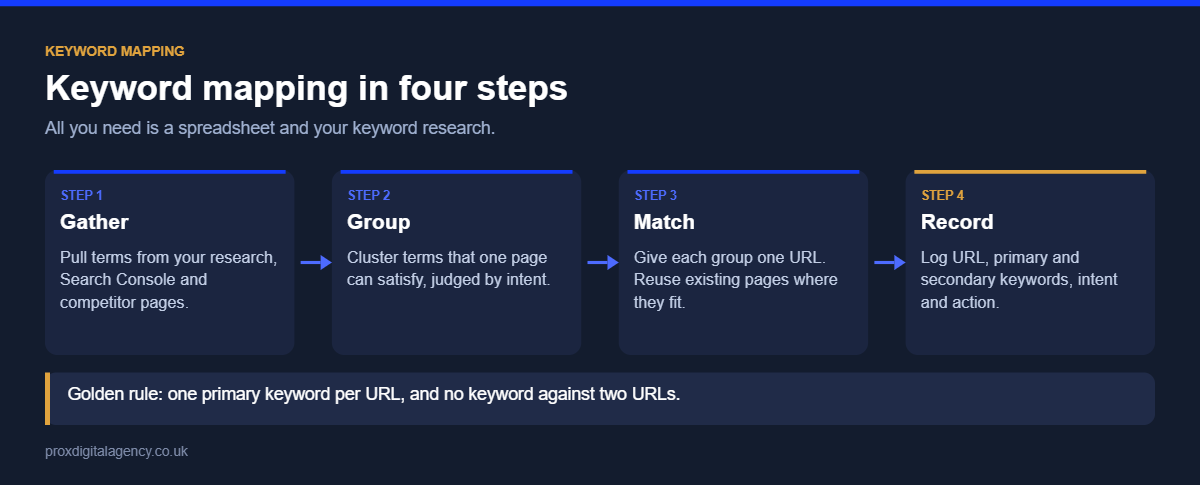
Step 1: Gather Your Keywords
First, pull terms from your existing research, Google Search Console and competitor pages. For example, a competitor keyword analysis shows which searches rivals rank for and you do not. If you are starting from scratch, follow our step-by-step guide on how to do keyword research for UK businesses.
Step 2: Group Keywords by Search Intent
Next, group the terms that one page can satisfy. Judge by intent rather than shared words. For example:
- “Wireless headphones” and “Bluetooth headphones” share the same intent, so they belong on one page.
- “Wireless headphones” and “wireless headphones price” may have different intent. In that case, consider separate pages if the search results and content needs differ.
Step 3: Match Each Group to One URL
Then give each keyword group one URL. Start by auditing your existing pages. If a page already matches the intent, assign the group to it, rather than creating a new page for every variation. Where no page fits, mark the group as “new page needed”. Also, follow three simple rules:
- First, each URL has one primary keyword.
- Second, secondary keywords support that same intent.
- Finally, no keyword appears against two URLs.
Step 4: Record Everything in a Keyword Mapping Sheet
Finally, put every decision in one spreadsheet, like the example below:
As the map grows, add columns for the page owner, the current ranking position and the last review date.
How to Avoid Cannibalisation With Keyword Mapping
Keyword cannibalisation happens when several pages target the same search intent. As a result, Google has to pick one. It may choose the wrong page, or it may rank none of them well.
SEO keyword cannibalisation also splits backlinks and internal links across several URLs. A keyword mapping sheet exposes this before you publish. So, always check the map first, because updating an old page often beats writing a new one.
Spot Pages That Compete With Each Other
To begin with, run these three checks to find any existing overlap:
- Open the Performance report in Google Search Console. Filter by one query and open the Pages tab. If several URLs appear for one query, that is a warning sign.
- Next, search site:yourdomain.co.uk “target keyword” to list similar pages.
- Also watch for rankings that swap between two URLs from week to week.
Are two of your pages competing for the same keyword?
Send us your website. We will check Search Console for pages that split the same queries and show you which to merge, redirect or rewrite, free.
Get a free cannibalisation checkSee our on-page SEO services →
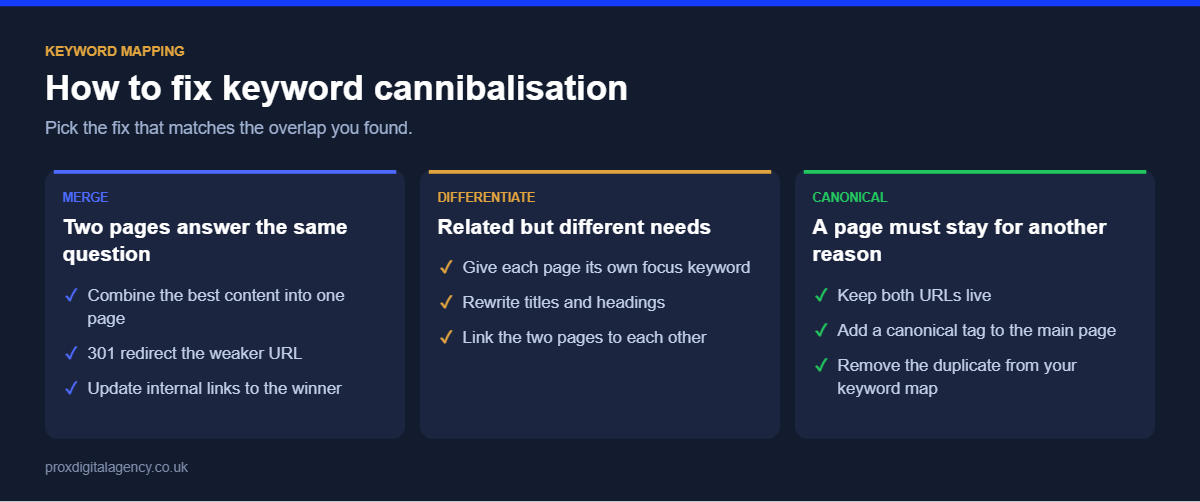
Fix the Overlap by Merging, Redirecting or Differentiating
Once you find an overlap, then choose the right fix:
Google explains both options in its guides to redirects and canonical tags.
Keyword Mapping for Local Service Pages
Local sites face a particular risk, however. Often, teams copy one service page for every town and change only the place name. Those pages overlap heavily, so keyword mapping keeps them distinct.
Create a separate location page only when its content is genuinely different. For instance, include the areas served, local staff, reviews and examples of local jobs. “Electrician Bristol” and “electrician Bath” can justify separate pages. However, two near-identical pages cannot. Our guide to local keyword research shows how to find the town and postcode terms each location page should target.
Build a Keyword Mapping Plan That Works
Keyword mapping turns research into a clear page plan. Each URL gets one purpose, and overlaps become easy to spot and fix. Start with a simple sheet, review it every quarter and update it whenever you plan new content.
If you want expert help, Prox Digital Agency can build and maintain your map. Our keyword research and page-planning services assign keywords to pages, fix overlaps and plan new content around real demand. Then our on-page SEO services apply each keyword to your titles, headings and page copy.
Prox Digital Agency
Give every page on your site one clear job
We assign each keyword group to the right page, find the pages that compete with each other, fix the overlaps and plan new content around real demand. Start with a free cannibalisation check.
Frequently Asked Questions
What is keyword mapping?
Keyword mapping is the process of deciding which primary keyword, secondary keywords and search intent belong to each page on a website. Usually, the decisions are recorded in a spreadsheet, so every page has one clear target.
How many keywords should each page target?
Each page should have one primary keyword and around three to five secondary keywords. However, all of them must share the same search intent.
How often should I update my keyword map?
Review your keyword map at least once every three months. In addition, update it whenever you add, merge or remove pages on your website.
Do I need software for keyword mapping, or is a spreadsheet enough?
For small and medium-sized websites, a spreadsheet is enough. Larger websites, by contrast, may benefit from a tool that groups keywords automatically.
Does keyword mapping help local SEO?
Yes. Keyword mapping keeps your service pages and location pages distinct, so each one can rank for its own local searches.


 Prox Digital Agency, London
  5 mins
Prox Digital Agency Named Second in NeuralAdX Ltd’s “Best Google Gemini Optimisation Agency UK” Comparison

International SEO Keyword Research: How We Research New Markets (UK, US, UAE and Australia)

Niche Keyword Research: How to Find Low-Competition Keywords Your Competitors Miss

Keyword Research for PPC: How to Find Google Ads Keywords That Convert

Competitor Keyword Analysis: How to Find and Win the Keywords Your Rivals Rank For

How to Do Keyword Research: A Step-by-Step Guide for UK Businesses (2026)

Headless SEO: How to Rank a Headless CMS or API-Driven Website

Faceted Navigation SEO: Stop Filters Wasting Crawl Budget on Your Ecommerce Site