Internal linking is the cheapest ranking lever most websites never pull. It needs no outreach and no new content, because it works on the pages you have already published.
Yet it is usually the first thing to slip. Writers link forward to new posts and rarely go back. Redesigns quietly drop links. Over a couple of years you end up with a library of articles that Google reads as separate arguments rather than one authoritative body of work.
This guide covers what topical authority actually is, how the hub-and-spoke model builds it, the five internal linking mistakes that quietly cost rankings, and a one-hour audit you can run on your own site today.
What Topical Authority Actually Means
Topical authority is not a score you can look up. It is the outcome of a search engine reading your site and concluding that you cover a subject completely, consistently, and with a clear centre of gravity.
Most sites confuse coverage with authority. They publish twenty posts about web design, all competing for overlapping terms, none of them positioned as the definitive resource, and none of them connected. To a crawler, that is twenty separate arguments rather than one strong one. Every page has to fight for relevance on its own, because nothing on the site says which page matters most.
Internal linking is what turns coverage into authority. When a crawler lands on a page, the links around it are the only clue about where it sits in your hierarchy. A post with three inbound links from related articles and one link up to a comprehensive parent page is legible: topic, cluster and hierarchy in a single pass. An identical post with no inbound links is just a URL in a sitemap.
This matters more in 2026 than it did three years ago, and for a new reason. AI Overviews and LLM answer engines do not rank ten links; they select passages to cite, which means resolving which page on your domain is the authority for a given claim. Four pages saying similar things with no internal hierarchy give the model no way to choose so it usually chooses someone else’s site.
Here is the practical internal linking test. Pick your most important topic. Can a stranger, starting from any post on that topic, reach the definitive page in one click? If not, you have content but no authority.
What Is the Hub and Spoke Internal Linking Model?
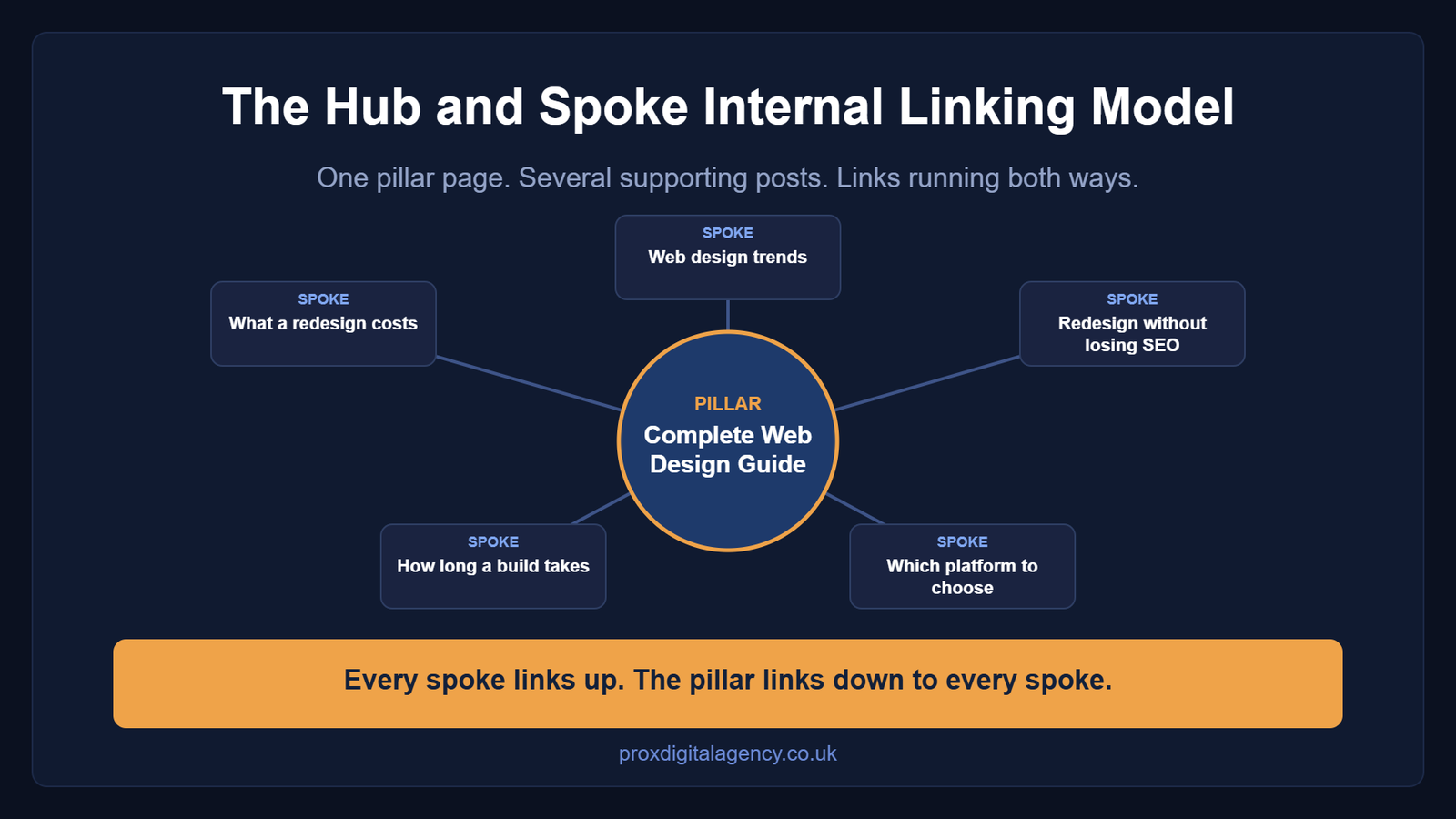
The hub-and-spoke internal linking model is straightforward once you strip away the jargon. One pillar page covers a topic broadly and comprehensively. Several supporting posts each cover one narrow slice of that topic in real depth. Every spoke links up to the pillar. The pillar links down to every spoke. Links run both ways, always.

Our ownComplete Web Design Guide 2026 is a working example. It covers trends, best practices, agency selection, project planning and cost in one place, deliberately broad, because a pillar’s job is to be the map rather than the territory. Individual questions inside that topic (what a redesign costs, how long a build takes, which platform to choose) get their own posts, and each one points back to the guide.
Our post onMVP Development Timelines shows the other side. It goes deep on one question, how long an eight-to-sixteen-week build actually takes, stage by stage which makes it a textbook spoke. It would be a weak pillar and a strong supporting page, and treating it as the latter lets it rank for the query it deserves while feeding authority upward.
Two rules keep your internal linking honest. First, one pillar per topic, if you have two candidates, you have a consolidation to do, not a cluster. Second, spokes may link to each other, but sparingly and only where the connection is genuinely useful to a reader. A cluster where every page links to every other page is not a cluster; it is noise, and we will come back to why.
The Five Internal Linking Mistakes That Cost Rankings
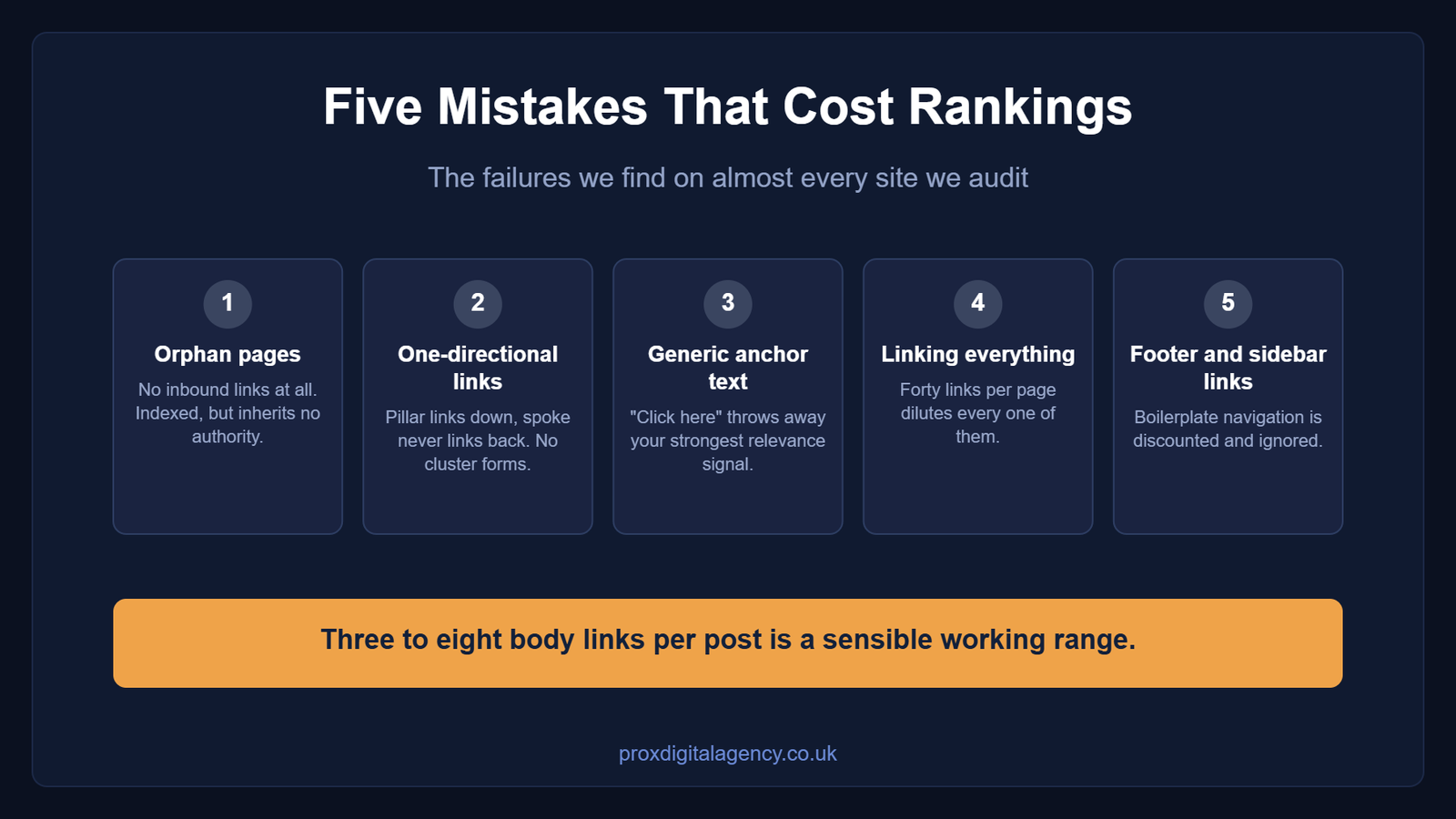
1. Orphan Pages
An orphan page has no internal links pointing at it from anywhere on the site. It exists in the sitemap and nowhere else. Google may index it, but it inherits no authority and no topical context, so it rarely ranks for anything competitive. Orphans are usually accidental: a post published in a hurry, or a page that lost its links in a redesign. They are also the single fastest thing to fix, one relevant inbound link from a related post is often enough to move a page from invisible to competing.
2. One-Directional Internal Links
Pillar links to spoke, spoke does not link back. This is the most common failure we see, and it is easy to understand why: writers link forward to new content and rarely go back to update old content. The cost is real. A one-way link tells the crawler the pillar knows about the spoke, but nothing tells it the spoke belongs to the pillar. The relationship only becomes a cluster when both pages acknowledge each other.
3. Generic Anchor Text
“Click here”, “read more”, “this post”. Anchor text is one of the strongest internal linking signals you control, and generic anchors throw it away. They also hurt accessibility: a screen reader user tabbing through links hears “link, click here” six times with no idea where any of them go. If the anchor does not describe the destination, it is doing no work.
4. Linking Everything to Everything
The mirror-image error. Forty internal links on every page dilutes each one to near-irrelevance and buries the links that matter. They also compete for attention: a paragraph with four links in it usually gets none of them clicked. Three to eight body links per post is a reasonable working range.
5. Links Buried in Footers and Sidebars
A link in a site-wide footer appears on every page, which sounds efficient and is close to worthless: search engines discount boilerplate navigation and readers ignore it. A link inside body copy, surrounded by a sentence explaining why the reader should follow it, carries more weight and gets clicked far more often.
Anchor Text: How Specific Is Too Specific?
The guardrail is this: never use the same anchor text for two different URLs, and never point a spoke’s anchor at the exact head term your pillar is trying to rank for. Both are self-inflicted keyword cannibalisation.
The first case is the more obvious. If three posts link to three different pages using the anchor “website redesign”, you have told Google that three URLs are the best answer for that phrase. It will pick one, usually not the one you wanted and the other two will hover around position fifteen indefinitely.
The second case is subtler and more damaging. Say your pillar targets “web design guide” and you have spoken about design costs. If the spoke’s inbound anchors read “web design guide”, you have handed your pillar’s primary term to a page that should not be competing for it. The fix is to make each anchor describe its own destination as narrowly as that destination deserves: “what a website design costs in 2026” for the costs post, “our complete web design guide” for the pillar.
Too specific is a rarer failure mode, but a real one. An anchor stuffed with five modifiers (“affordable bespoke London ecommerce web design agency pricing”) reads as spam and adds nothing a shorter phrase would not. The test: would you write this phrase in a sentence if you were not thinking about SEO? If yes, it is fine. Varying the wording across pages is healthy, not a problem.
Internal Linking in Practice: Three Consolidations
Internal linking works best when the underlying content structure makes sense. You cannot solve five overlapping articles by linking them to one another and hoping Google develops a favourite. Sometimes the right move involves consolidation.
Here are three common consolidation scenarios that reflect the kind of decisions we make when reviewing an existing content architecture.
Consolidation One: Several Similar Pages, One Clear Winner
Imagine a site has three articles covering slightly different versions of the same question:
- How long does MVP development take?
- MVP development timeline explained
- How many weeks does it take to build an MVP?
The titles differ. The search intent barely does. Keeping all three pages creates unnecessary competition. Instead, choose the strongest URL based on factors such as existing rankings, backlinks, topical relevance and content quality. Consolidate useful information into that page, then redirect the weaker overlapping URLs where appropriate.
The final page becomes the clear destination for that intent. Your internal linking should then reinforce that decision. This approach fits naturally with a broader content structure around MVP development. For example,MVP Development Timelines can serve as the dedicated destination for users researching how long an MVP takes, while broader MVP pages focus on strategy, validation or development services.
The lesson is simple: do not create three destinations for one question when one excellent destination can do the job.
Consolidation Two: A Website Redesign and Its SEO Questions
Website redesign content often fragments over time. One article discusses redesign planning. Another covers redirects. A third explains lost rankings. A fourth discusses changing URLs. Each topic can deserve its own page, but only if each page addresses a genuinely distinct intent.
A broad article such asHow to Conduct a Complete Website Redesign Without Losing SEO Equity can act as the strategic hub for the wider problem. More technical guidance around URL changes, redirect mapping and migration checks can then point readers towards the detailedFull SEO Website Migration Checklist Guide.
The important distinction comes from intent.
The redesign article answers, “How do I redesign my site without damaging organic performance?”
The migration guide answers, “What technical steps do I need to complete when moving or restructuring URLs?”
Those pages support one another. They do not need to compete. When an older article duplicates either purpose without adding unique value, consolidation may create a cleaner structure. A properly implemented 301 redirect can direct users and search engines from the retired URL to the relevant surviving page while preserving the value associated with the old URL as far as the redirect relationship allows.
Internal linking should change as well. This step matters. Redirecting an old page but continuing to link to it internally creates unnecessary detours. Update internal links so they point directly to the surviving destination.
Consolidation Three: The Service Page That Competes With Its Own Blog
Another common problem appears when blogs target the same commercial intent as service pages. A company may publish:
- SEO agency services
- What does an SEO agency do?
- SEO services for businesses
- Why hire an SEO agency?
These pages can coexist, but only when they perform different jobs. For example,What Does an SEO Agency Actually Do? can answer an informational question for someone who wants to understand the role of an agency. The commercial service page can then become the destination for users ready to explore an actual provider. That gives you a natural internal linking journey.
The informational article explains the value, process and scope of SEO work. When the reader reaches the point where they want professional support, you can direct them towards Prox’sSEO service page.
Each page owns a different stage of intent. That is far stronger than creating five blog posts that all quietly try to rank for the same commercial query.
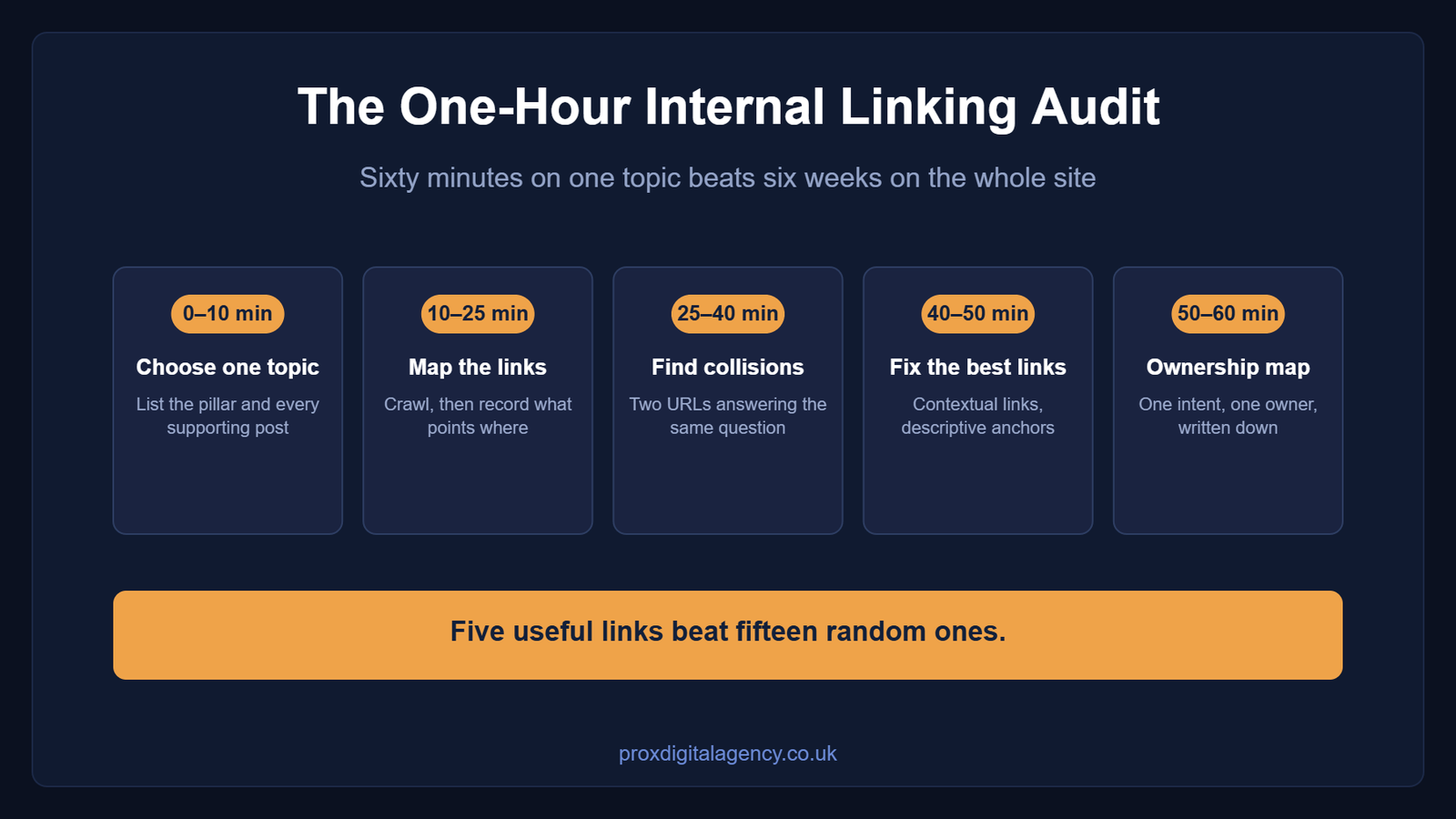
How to Audit Your Internal Linking in an Hour
You do not need a six-week enterprise project to find the biggest internal linking problems. Set aside an hour and focus on the pages that matter most.
Minutes 0–10: Choose one topic
Do not audit your entire website first. Pick one important subject, such as web design, SEO, MVP development, or ecommerce. List the pillar page and every supporting article that belongs within that topic. You are looking for relationships, not simply counting links. Ask which page acts as the broadest resource and which pages answer narrower questions.
Minutes 10–25: Map the existing links
Map your existing internal linking with a crawl. Gather the data quickly using a tool like Screaming Frog (the free tier covers up to 500 URLs) or export the internal links report directly from Google Search Console. Open your pages and record:
- Which pages link to the pillar
- Which supporting pages receive links from the pillar
- Which relevant supporting pages link to one another
- Which URLs receive zero contextual links (orphans)
- Which pages receive links using vague or repetitive anchor text
You can organise this in a spreadsheet or a simple document for smaller sites. At this stage, avoid adding links randomly. First, understand the existing structure.
Minutes 25–40: Look for intent collisions
Review the titles, primary topics, and search intent of every page.
- Do two URLs answer essentially the same question?
- Do several pages target slightly different versions of the same keyword without offering a meaningful difference in purpose?
- Does one article exist purely because someone wrote a new variation of an old topic?
Mark those pages for review. You do not need to redirect everything immediately. First decide which page should own the intent. Then determine if you should merge content, rewrite one page around a clearer angle, or remove the overlap entirely.
Minutes 40–50: Fix the highest-value links
Start with your most important pages. Add contextual internal links where readers genuinely need the next piece of information. Replace generic anchors with descriptive language. Make sure supporting pages link back to the relevant hub when the connection benefits the reader. Avoid the temptation to hit an arbitrary number of links per page. Five useful links beat fifteen random ones.
Minutes 50–60: Create your ownership map
Finish by documenting which URL owns which intent. Your map might look like this:
| The question a reader is asking | The page that owns it | Role in the cluster |
|---|
| What does good web design involve, end to end? | Complete Web Design Guide | Pillar |
| How long does an MVP build actually take? | MVP Development Timelines | Spoke |
| How do I redesign without losing rankings? | Website Redesign Without Losing SEO Equity | Pillar |
| What are the technical steps when URLs move? | SEO Website Migration Checklist | Spoke |
| Which pages should I merge or remove? | Content Pruning | Spoke |
| What does an SEO agency actually do? | What Does an SEO Agency Do | Informational |
| I want someone to do this for me | SEO service page | Commercial |
One row per intent, one owner per row. If two pages claim the same row, you have found your next consolidation, and our guide to content pruning covers how to resolve it without losing equity.
Getting Your Internal Linking Right
Internal linking is structural work rather than a content task, which is why it so often sits unowned. Nobody’s job description says “maintain the link graph”, so it drifts.
The audit above is enough for most sites under a hundred pages. Beyond that, with redirect history, competing templates and several thousand URLs, internal linking becomes ongoing maintenance rather than a one-off fix.
If you would rather it was someone else’s job, our SEO team treats internal linking and content structure as part of every engagement. Talk to Prox about your site.
Internal Linking FAQs
How many internal links should a blog post have?
Three to eight body links suits most posts of 1,500 to 2,500 words. The number matters far less than placement and relevance: one link inside a paragraph that explains why the reader should follow it beats ten links crammed into a related-posts block at the bottom.
Does internal linking still matter now that AI answers so many queries?
Internal linking matters more, not less. Answer engines have to decide which page on your domain is authoritative for a claim before they cite it. A clear hub-and-spoke structure with one obvious pillar makes that decision easy. Four near-identical pages with no hierarchy make it impossible, so they cite a competitor.
How long before internal linking changes affect rankings?
Expect four to twelve weeks for meaningful movement, depending on how often your site is crawled. Fixing an orphan page can show results in days because the page had nowhere to go but up. Resolving cannibalisation between two established pages usually takes a full quarter to settle.
Should I use exact-match anchor text for internal linking?
Use descriptive anchors that vary naturally, not the same exact-match phrase every time. Never point one anchor phrase at two different URLs, and never hand a spoke the head term your pillar targets. Beyond that, write the anchor you would write if you were not thinking about SEO.
Is it better to link from blog posts to service pages, or between blog posts?
Do both, in different proportions. Blog-to-blog links build the topical structure search engines read. Blog-to-service links pass that authority to the pages that earn revenue. One service link per post, placed where a reader would genuinely want it, is usually right, more reads as sales copy.
Should I fix internal linking myself or hire an agency?
On a site under a hundred pages, do it yourself using the audit above, the fixes are mechanical. At several thousand URLs with redirect history and competing templates, structural work becomes ongoing rather than one-off, which is one of thethings an SEO agency actually does month to month.


 US
US UK
UK +44 (7) 43 8304 605